Starting a new Pinterest account can feel slow.
You publish pins, wait for impressions, check analytics, and sometimes it feels like nothing is happening. Unlike platforms where content can get instant reactions, Pinterest usually needs a different kind of patience. It behaves more like a search engine than a social media app.
That is exactly why I wanted to run a small test.
I wanted to see what would happen if I took a brand-new Pinterest account and focused less on random posting, and more on a structured Pinterest SEO workflow.
The goal was simple:
Can a new Pinterest account start getting early impressions, engagements, saves, and outbound clicks without having an existing audience?
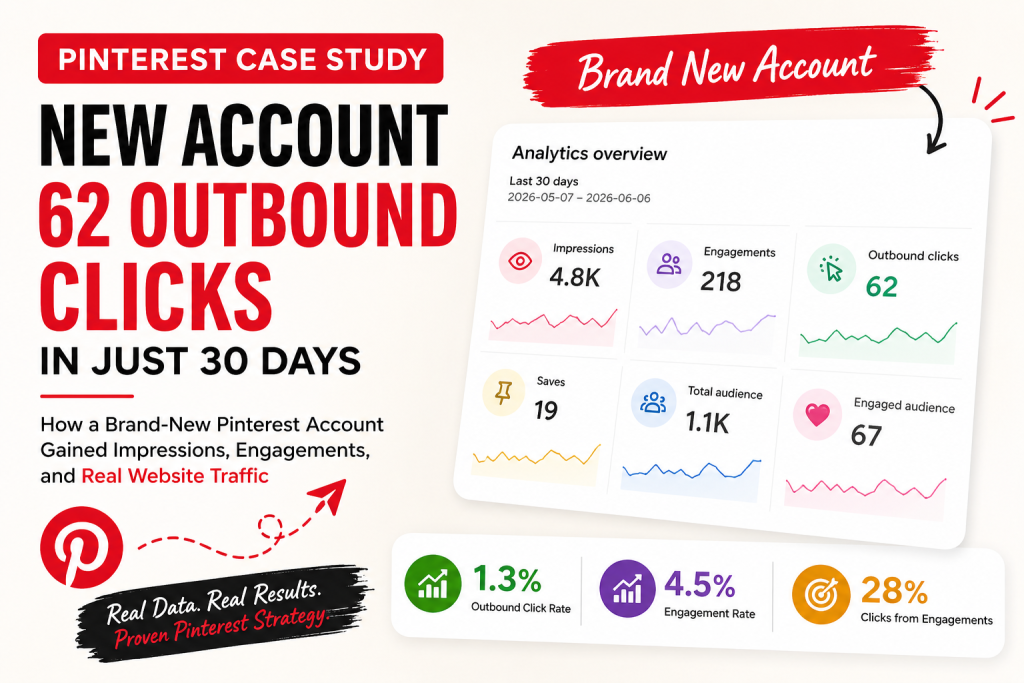
After around 30 days of testing, the account reached:
- 4.8K impressions
- 218 engagements
- 62 outbound clicks
- 19 saves
- 1.1K total audience
That works out to roughly:
- 1.3% outbound click rate
- 4.5% engagement rate
- Around 28% of engagements turning into outbound clicks
These are not viral numbers, and I do not want to pretend they are.
But for a brand-new Pinterest account, these are healthy early signals. More importantly, the test showed something valuable: Pinterest growth is not just about posting more pins. It is about creating the right pins, matching the right keywords, using the right boards, and tracking the right metrics.
This case study breaks down what I tested, what worked, what did not matter as much, and why outbound clicks are one of the most important Pinterest metrics to watch.
Why I Started This Pinterest Test
Pinterest is often misunderstood.
A lot of people treat Pinterest like Instagram or Facebook. They post an image, hope people like it, and then judge success based on impressions or saves.
But Pinterest works differently.
Pinterest is a visual discovery engine. People go there to search for ideas, recipes, products, tutorials, home inspiration, fashion tips, business advice, and content they want to save for later.
That means your pins need to do more than look nice.
They need to match what people are searching for.
This is where Pinterest SEO becomes important.
For this test, I wanted to avoid the common mistake of posting pins randomly. Instead, I focused on a cleaner workflow:
- Find or choose a topic with search intent.
- Create keyword-focused pin titles.
- Write descriptions that clearly match the topic.
- Create fresh pin variations.
- Match each pin to the most relevant board.
- Track outbound clicks, not only impressions.
I also used an AI tool workflow to speed up parts of the process, especially for keyword ideas, pin copy, and creating different pin angles. This made the workflow easier because I did not have to start every pin from scratch.
That does not mean AI magically grows a Pinterest account.
It does not.
But when used properly, AI can help create more structured pin ideas, improve titles and descriptions, and reduce the time spent manually creating variations.
The key is still strategy.
The 30-Day Pinterest Results
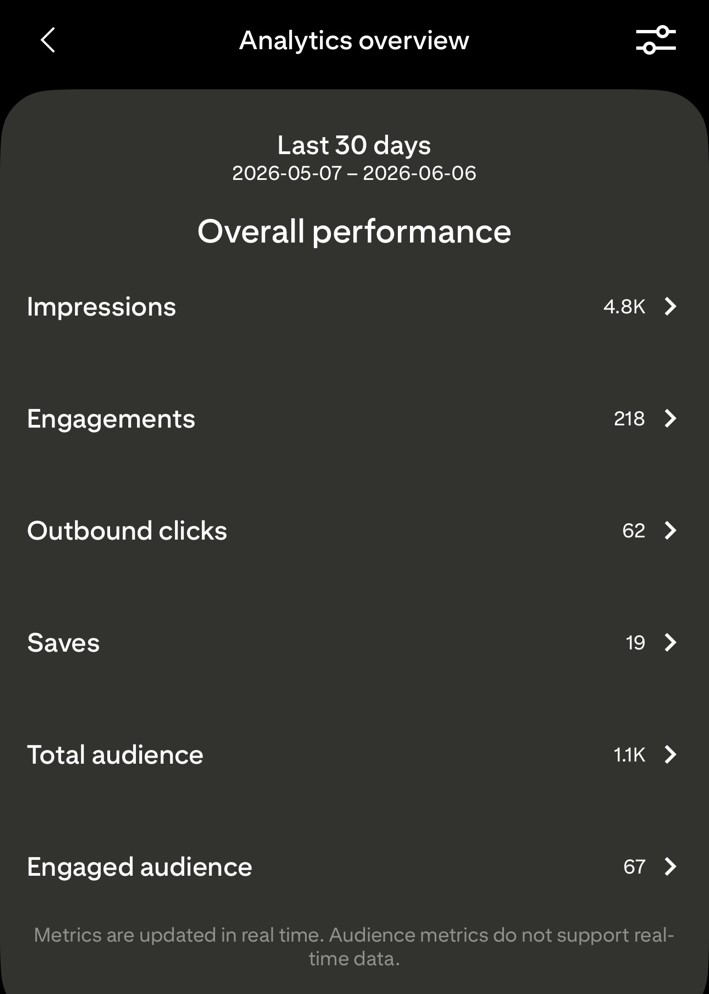
Here are the early results from the brand-new account:
- Impressions: 4.8K
- Engagements: 218
- Outbound clicks: 62
- Saves: 19
- Total audience: 1.1K
At first glance, 4.8K impressions might not look huge. But this was a new Pinterest account with no long history, no existing traffic base, and no authority built up yet.
The more interesting number is not the impressions.
It is the outbound clicks.
The account received 62 outbound clicks from 4.8K impressions. That means around 1.3% of impressions turned into outbound clicks.
For a new Pinterest account, that is a useful signal.
It suggests that some of the pins were not only being seen, but they were also attracting the right people. People were not just saving or scrolling past. Some were actually clicking through.
That matters because if you are using Pinterest for blogging, affiliate marketing, ecommerce, SaaS, recipes, or digital products, traffic is usually the main goal.
Impressions are nice.
Saves are helpful.
Engagements are useful.
But outbound clicks are where Pinterest starts becoming a real traffic channel.
Why Outbound Clicks Matter More Than Impressions
One of the biggest mistakes people make with Pinterest analytics is focusing only on impressions.
Impressions tell you how often your pins were shown.
That is useful, but it does not tell the whole story.
A pin can get a lot of impressions and still send almost no traffic. This usually means one of three things:
The image attracted attention, but not enough curiosity.
The title did not give people a reason to click.
The pin did not match the search intent strongly enough.
For example, a beautiful pin might get shown often because Pinterest understands the image category. But if the text overlay is unclear, the headline is too generic, or the description does not align with what users want, people may not click.
That is why outbound clicks are so important.
Outbound clicks show that someone saw your pin and decided to leave Pinterest to visit your website.
That is a much stronger action than just seeing the pin.
For this test, the outbound click rate was around 1.3%. That means for every 100 impressions, around 1.3 people clicked through to the website.
Again, this is not massive. But for a brand-new account, it is a positive early sign.
The bigger lesson is this:
Do not only ask, “How many impressions did this pin get?”
Ask, “Did this pin attract the right person and make them click?”
That one question changes your whole Pinterest strategy.
The Workflow I Used
For this case study, I did not rely on random posting.
I followed a repeatable Pinterest content workflow.
The workflow looked like this:
Topic selection came first.
Instead of creating pins for any random article or page, I focused on topics that had clear search intent. Pinterest users search with intent. They want ideas, solutions, inspiration, tutorials, recipes, guides, or product recommendations.
Then I worked on the pin title.
This matters more than many people think. A weak pin title can kill the click, even if the image is good.
A strong Pinterest title should be clear, keyword-focused, and easy to understand quickly. People scroll fast. They should know what the pin is about within one or two seconds.
Then I created the description.
The Pinterest description should naturally include the main keyword and related terms, but it should not feel stuffed. The goal is to help Pinterest understand the content while also giving the user a reason to click.
After that, I created multiple pin variations.
This is important because one pin design rarely tells you the full story. Sometimes a different headline, background image, layout, or angle can perform much better than the first version.
For example, one pin angle might focus on “easy dinner idea,” while another focuses on “high-protein family meal.” Both may point to the same article, but they reach slightly different user intent.
Then I matched each pin to a relevant board.
Board relevance still matters. If you publish a pin about Pinterest automation to a general business board, it may work. But if you publish it to a board specifically about Pinterest marketing, Pinterest has a clearer signal about the content.
Finally, I tracked the numbers.
I did not only check impressions. I looked at engagements, saves, and outbound clicks. The goal was to understand which pins were actually creating traffic potential.
How AI Helped in the Process
I want to be clear about this: AI did not replace the strategy.
AI helped speed up the workflow.
There is a big difference.
For this test, I used an AI-assisted workflow to help with:
- Keyword ideas
- Pin title variations
- Pin descriptions
- Fresh content angles
- Different headline ideas
- Faster pin planning
This helped because Pinterest growth often requires consistency. You need fresh pins. You need different angles. You need to keep testing.
Doing all of that manually can become slow, especially if you are managing a blog, recipe site, ecommerce store, affiliate site, or multiple client accounts.
An AI Pinterest tool can make the process easier by reducing the amount of repetitive work.
For example, instead of writing one pin title and stopping there, AI can help generate several title options around different search intents.
One title might be more curiosity-based.
Another might be more keyword-focused.
Another might be more benefit-driven.
Then you can test which one performs better.
This is one of the reasons I am building PinBoostr around a broader Pinterest workflow, not just scheduling.
Scheduling is useful, but scheduling alone is not the full strategy.
A better Pinterest automation tool should help with the full process:
- Research
- Pin creation
- SEO-friendly titles
- SEO descriptions
- Board matching
- Scheduling
- Analytics
- Performance learning
That is where Pinterest automation becomes more valuable.
Not automation for the sake of posting more.
Automation that helps you create better pins, faster.
What Worked Best
The biggest thing that worked was creating pins with clearer intent.
Generic pins usually struggle because users do not immediately understand why they should click.
Pinterest users are often looking for something specific.
They may be searching for:
- Easy weeknight dinner ideas
- Pinterest marketing tips
- Spring nail ideas
- Home office inspiration
- High-protein recipes
- Blogging traffic strategies
- Digital product ideas
- DIY organization tips
If your pin does not clearly match what they are looking for, it becomes easy to ignore.
During this test, the better-performing pins had a few things in common.
They had clear titles.
They matched the content topic.
They used keywords naturally.
They were placed on relevant boards.
They had a reason to click.
That last point is important.
A pin should not only describe the content. It should create a reason to visit the page.
For example, “Pinterest Tips” is too broad.
“7 Pinterest SEO Mistakes That Stop Your Pins From Getting Clicks” is stronger because it gives the user a reason to click and learn more.
The same idea applies to recipes, fashion, beauty, home decor, business content, or any other Pinterest niche.
Clarity wins.
What Did Not Matter as Much
One thing I noticed is that simply posting more does not automatically mean better results.
More pins can help, but only if the pins are useful, clear, and targeted.
If you publish 100 weak pins, you may get some impressions, but the clicks may stay low.
If you publish fewer but stronger pins with better keyword targeting and clearer design, you may get better engagement and traffic.
This is why I think many people get disappointed with Pinterest.
They hear that they need to post consistently, so they start posting a lot. But they do not improve the pin titles, descriptions, images, boards, or content angles.
Then they wonder why nothing is working.
Consistency matters, but strategy matters more.
Another thing that did not matter as much was chasing perfect design.
A pin does not need to be the most beautiful design on Pinterest. It needs to be clear, relevant, and clickable.
Good design helps. But overdesigning can hurt if the message becomes hard to read.
For Pinterest, simple often works better:
- Clear headline
- Strong contrast
- Relevant image
- Easy-to-read text
- Clean layout
- Obvious topic
The goal is not to win a design award.
The goal is to stop the scroll and earn the click.
The Importance of Fresh Pin Variations
Fresh pin variations are one of the most important parts of Pinterest growth.
A fresh pin does not always mean you need a completely new blog post or product page. It means creating a new pin image or new creative angle for the same URL.
This is useful because different people respond to different hooks.
For example, if you have one blog post about Pinterest traffic, you could test pin angles like:
- How to get more outbound clicks from Pinterest
- Pinterest SEO tips for beginners
- Why your Pinterest impressions are not turning into clicks
- How to grow a new Pinterest account
- Pinterest strategy for bloggers
- Pinterest automation workflow for traffic growth
All of these could point to related content, but each angle attracts a slightly different type of searcher.
This is where AI can be helpful. It can generate multiple pin angles faster, but you still need to choose the ones that make sense.
The mistake is using AI blindly.
The better approach is to use AI as a brainstorming assistant, then apply human judgment.
Ask yourself:
Would someone actually click this?
Is the benefit clear?
Does the keyword match the content?
Is the promise realistic?
Does the pin feel useful?
That combination is powerful.
Pinterest SEO Lessons From This Test
This test reminded me that Pinterest SEO is not complicated, but it does need structure.
Pinterest needs signals to understand your content.
Those signals come from your pin title, description, board, image, text overlay, and linked page.
When those signals all match, Pinterest has a better chance of understanding where to place your pin.
For example, if your pin is about “Pinterest automation tool,” then the pin title, description, board, and page content should all support that topic.
If the title says Pinterest automation, the image says social media tips, the board is general marketing, and the page is about something unrelated, the signals are weak.
But if everything lines up, the pin becomes easier to understand.
That does not guarantee instant ranking.
Pinterest still needs time, testing, and engagement data.
But strong relevance gives your pin a better starting point.
For a new account, this matters even more because the account does not have much history yet. Every signal helps.
Why New Pinterest Accounts Need Patience
A brand-new Pinterest account usually will not explode overnight.
That is normal.
Pinterest needs time to understand the account, the boards, the content topics, and how users respond to the pins.
This is why I would not judge a new account after just a few days.
A better approach is to track progress over 30, 60, and 90 days.
In the first 30 days, I would look for early signals:
- Are impressions starting?
- Are any pins getting saved?
- Are outbound clicks happening?
- Which topics are getting noticed?
- Which boards seem to match best?
- Which pin styles are getting engagement?
The first month is not always about massive traffic.
It is about learning what Pinterest is responding to.
That is exactly how I viewed this test.
The 4.8K impressions were a starting signal.
The 62 outbound clicks were more important.
They showed that some pins were attracting people with enough interest to leave Pinterest and visit the website.
That is the kind of signal worth building on.
What I Would Improve Next
The next step is not just posting more of the same.
The next step is improving based on the data.
Here is what I would focus on next:
First, I would identify the pins with the highest outbound click rate.
Those pins are important because they show which topics and angles are creating traffic.
Second, I would create more variations around those winning angles.
If one topic is getting clicks, I would not ignore it. I would create more pins around that topic with different headlines, layouts, and descriptions.
Third, I would review the low-click pins.
Some pins may get impressions but very few clicks. Those pins need better hooks, clearer images, stronger headlines, or better keyword alignment.
Fourth, I would build stronger board relevance.
For a new account, boards should be clean and focused. A messy board strategy can make it harder for Pinterest to understand the account.
Fifth, I would continue tracking outbound clicks.
The goal is not just Pinterest activity. The goal is website traffic.
That is why PinBoostr is being built around performance, not just posting.
A Pinterest tool should help users understand what is happening, not just schedule pins and leave them guessing.
My Main Takeaway
The biggest takeaway from this case study is simple:
Pinterest works better when you treat it like a search engine.
If you only post random pins, you may get random results.
But if you use a structured workflow, even a brand-new Pinterest account can start showing early signs of growth.
This test generated 4.8K impressions, 218 engagements, 62 outbound clicks, and 19 saves in around 30 days.
Again, these are not huge numbers.
But they are meaningful because they came from a new account, and they show that a keyword-focused Pinterest workflow can create early traction.
The real lesson is not “post more.”
The lesson is:
Post with intent.
Create fresh pin variations.
Use Pinterest SEO.
Match pins to the right boards.
Track outbound clicks.
Improve based on data.
That is the workflow I believe more bloggers, creators, and businesses need if they want Pinterest to become a real traffic source.
How PinBoostr Fits Into This Workflow
This case study is also one of the reasons I am building PinBoostr.
Most people do not need another basic scheduler.
They need a smarter Pinterest workflow.
They need help with keywords, pin ideas, AI-generated titles, descriptions, fresh pin variations, scheduling, and analytics.
That is the direction PinBoostr is focused on.
The goal is not to replace human strategy.
The goal is to make the Pinterest growth process faster, cleaner, and easier to repeat.
Instead of jumping between tools, spreadsheets, design apps, keyword research, and analytics, the idea is to bring more of that workflow into one place.
Pinterest growth takes consistency, but consistency becomes much easier when the workflow is organized.
If you are trying to grow a blog, recipe site, affiliate site, ecommerce brand, or content business with Pinterest, the important question is not only “How often should I post?”
The better question is:
“Am I creating pins that match what people are actually searching for?”
That is where the real growth starts.
Final Thoughts
This was a small test, but it gave a useful reminder.
A new Pinterest account can still gain traction when the workflow is focused.
You do not need to go viral immediately.
You need early signals.
You need to understand what Pinterest is showing, what users are saving, and what people are clicking.
From this test, the most valuable result was not 4.8K impressions.
It was the 62 outbound clicks.
Because clicks show intent.
Clicks show that the pin did more than appear in the feed.
It made someone take action.
And that is the real goal of Pinterest marketing.
If you are starting a new Pinterest account, do not only focus on posting more pins. Focus on better pins.
Use keywords.
Create fresh variations.
Write clear titles.
Match the right boards.
Track outbound clicks.
Then keep improving.
That is how Pinterest becomes more than a place to post images.
It becomes a traffic engine.