Introduction
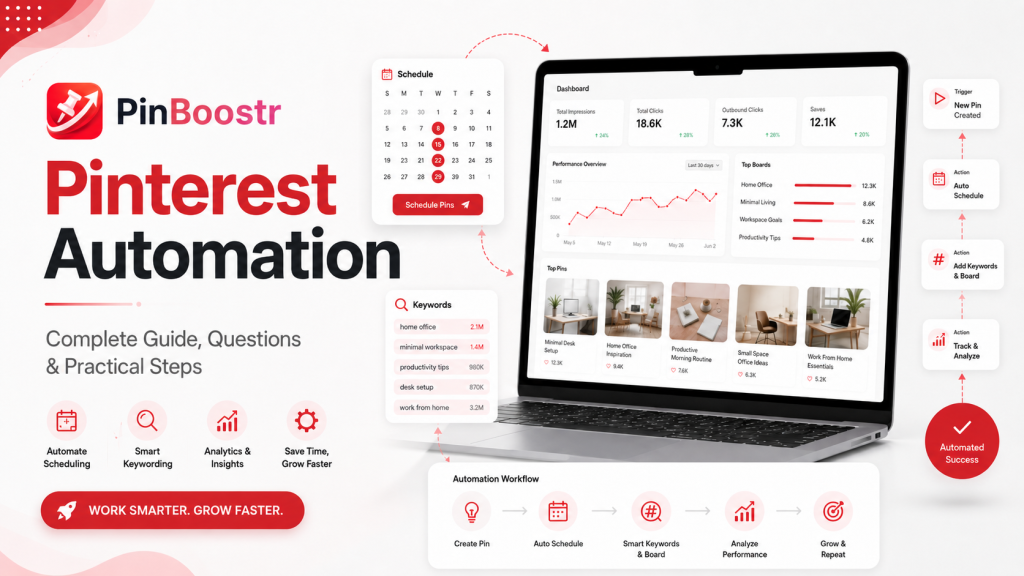
Pinterest automation means using tools, templates, systems, and repeatable workflows to make Pinterest marketing easier. Instead of manually researching keywords, writing pin titles, designing every pin from scratch, posting one by one, and checking results randomly, automation helps you turn those actions into a more organized process.
But Pinterest automation does not mean “set it and forget it forever.”
That is the biggest mistake beginners make.
Good Pinterest automation helps you save time while still keeping your content useful, relevant, and safe. Bad Pinterest automation creates spam, duplicate pins, weak descriptions, broken links, and account risk.
This guide explains what Pinterest automation is, how it works, how people use Pinterest to make money, what mistakes to avoid, and how to build a beginner-friendly Pinterest workflow that can grow over time.
What Pinterest Automation means and why it matters
What is Pinterest automation?
Pinterest automation is the process of using software or repeatable systems to help with Pinterest marketing tasks such as:
- Finding keywords
- Creating pin titles
- Writing pin descriptions
- Designing pin images
- Scheduling pins
- Organizing boards
- Tracking analytics
- Improving low-performing pins
- Testing different pin versions
For example, instead of writing 20 pin descriptions manually, a Pinterest automation tool may help you generate several keyword-rich descriptions based on your blog post, product page, or landing page.
Instead of posting every pin manually, a scheduler can help you publish pins across multiple days.
Instead of guessing what to create next, a keyword or analytics workflow can help you decide which topics deserve more pins.
The goal is not to remove strategy. The goal is to remove repetitive manual work so you can focus on better topics, better images, and better offers.
Why Pinterest automation matters
Pinterest is not exactly like Instagram, TikTok, or Facebook. It works more like a visual search engine.
People use Pinterest to search for ideas, save them, compare options, and take action later. That means your content can keep getting impressions and clicks long after the day you post it.
For bloggers, creators, Etsy sellers, affiliate marketers, coaches, recipe sites, and small businesses, Pinterest automation can help with three major problems:
- Consistency
Pinterest usually rewards regular publishing more than random posting. - Scale
A single blog post can often become multiple pins, titles, descriptions, and angles. - Testing
You rarely know the best pin image, headline, or keyword before publishing. Automation helps you test more variations.
Pinterest automation vs Pinterest ads automation
There are two types of Pinterest automation beginners often confuse.
The first is organic Pinterest automation. This includes scheduling pins, creating designs, writing titles, researching keywords, and analyzing results.
The second is Pinterest ads automation. Pinterest has automated ad campaign options that can help advertisers with bidding, targeting, and delivery. This is mainly for paid campaigns.
For most beginners, organic automation is the best place to start. You do not need to run ads before you understand your niche, content, audience, and conversion path.
First steps and common mistakes
Start with a clear Pinterest goal
Before using any automation tool, decide what you want Pinterest to do for you.
Common Pinterest goals include:
- Drive traffic to a blog
- Promote affiliate content
- Sell digital products
- Promote Etsy products
- Grow an email list
- Get leads for services
- Increase brand awareness
- Drive traffic to YouTube videos
- Promote recipes, printables, templates, or courses
Your automation workflow should match your goal.
For example, if your goal is blog traffic, your workflow should focus on keyword research, blog URL selection, pin titles, pin descriptions, image variations, and outbound click tracking.
If your goal is affiliate income, your workflow should focus on buyer-intent keywords, product comparison pins, trust-building descriptions, and safe disclosure practices.
If your goal is selling digital products, your workflow should focus on problem-aware content, lead magnets, product education, and conversion pages.
Do not automate before fixing your foundation
Pinterest automation will not fix a weak foundation.
Before automating, make sure you have:
- A Pinterest business account
- A clear profile name
- A keyword-rich bio
- A verified website if possible
- Relevant boards
- Board titles with searchable keywords
- Board descriptions
- A clean brand style
- Strong landing pages
- Working links
- Mobile-friendly pages
If your profile is unclear, your boards are messy, and your links are weak, automation will simply publish more weak content faster.
Common Pinterest automation mistakes
The most common mistakes are:
- Posting the same pin too many times
- Using the same title and description repeatedly
- Pinning to irrelevant boards
- Using low-quality AI images
- Writing descriptions that sound spammy
- Linking to thin or unrelated pages
- Ignoring Pinterest analytics
- Automating too aggressively on a new account
- Treating Pinterest like a quick-money platform
- Using clickbait that the landing page does not satisfy
Pinterest automation should make your system smarter, not louder.
How to avoid Pinterest jail
“Pinterest jail” is a casual term creators use when their account, pins, or domain seem restricted, limited, or suppressed. It is not always an official Pinterest label. Sometimes a drop in reach is caused by normal ranking changes, bad content quality, seasonal search changes, broken links, spam signals, or policy issues.
To reduce risk:
- Avoid spammy posting patterns
- Do not publish the same pin repeatedly in a short period
- Use fresh images and fresh text variations
- Avoid misleading claims
- Avoid prohibited or unsafe content
- Make sure every pin matches the destination page
- Do not use stolen images
- Do not use broken links
- Avoid aggressive affiliate linking without value
- Keep your account behavior natural
- Read Pinterest’s current community and merchant guidelines
A safe automation system should have limits. It should not blindly publish hundreds of pins without checking quality, link relevance, board relevance, and duplication.
Process, checklist, or framework
A simple Pinterest automation framework
Use this beginner framework:
- Research
- Create
- Schedule
- Track
- Improve
This is simple, but it works because Pinterest growth is not just about posting. It is about creating searchable, useful, and clickable content repeatedly.
Step 1: Research
Start by choosing a topic your audience already searches for.
You can research using:
- Pinterest search autocomplete
- Pinterest Trends
- Google search
- Google People Also Ask
- Competitor pins
- Your own blog analytics
- Your own product categories
- Pinterest Analytics
For example, if your niche is recipes, do not just create a pin titled “Chicken Dinner.”
Create angles like:
- Easy garlic parmesan chicken thighs
- Air fryer chicken thighs for busy weeknights
- High-protein chicken dinner recipe
- Crispy chicken thighs with simple ingredients
- Family-friendly chicken dinner idea
Automation can help collect related keywords and organize them into clusters.
Step 2: Create
Once you have the keyword cluster, create multiple pin variations.
For one blog post, you might create:
- 3 different pin headlines
- 3 different images
- 2 different descriptions
- 2 different calls to action
That gives you many possible combinations without creating a completely new article.
A good pin should have:
- One clear idea
- Readable text
- Strong image
- Clear benefit
- Relevant keyword
- Matching landing page
- Natural description
- Good board fit
Do not overcomplicate the design. Pinterest users scroll quickly. The pin needs to communicate the idea in seconds.
Step 3: Schedule
Scheduling helps you stay consistent.
A beginner schedule could look like this:
| Account stage | Suggested approach |
|---|---|
| New account | Start slowly, focus on quality and relevance |
| Growing account | Publish consistently with fresh variations |
| Established account | Increase volume carefully and track performance |
| Large content site | Use stronger automation, but keep quality controls |
There is no magic daily pin number that works for every account. The right number depends on your niche, content library, account history, audience, and quality level.
A safe beginner rule is this:
Start with fewer high-quality pins, watch performance, then scale gradually.
Step 4: Track
Do not judge every pin too early.
Pinterest can take time to test and distribute content. Some pins may get early impressions. Others may grow slowly.
Track:
- Impressions
- Saves
- Outbound clicks
- Click-through rate
- Board performance
- Topic performance
- Image style performance
- Title performance
- Landing page conversions
The most important metric depends on your goal.
If your goal is traffic, outbound clicks matter more than impressions.
If your goal is sales, conversions matter more than saves.
If your goal is brand awareness, impressions and saves may matter more.
Step 5: Improve
The best Pinterest automation system does not just publish. It learns.
Every week, review:
- Which topics got impressions?
- Which pins got clicks?
- Which boards performed best?
- Which designs got saves?
- Which keywords showed traction?
- Which links got no engagement?
- Which pins may need a better image?
- Which posts deserve more pin variations?
Then improve the system.
For example:
- If a pin gets impressions but no clicks, improve the headline or image.
- If a pin gets clicks but no conversions, improve the landing page.
- If a board gets no traction, review board relevance.
- If one topic performs well, create more related content.
- If one image style wins often, make more variations in that style.
This is where automation becomes powerful. Not because it posts more, but because it helps you test and improve faster.
Examples and edge cases
Example 1: Blogger using Pinterest automation
A food blogger publishes a recipe called “Air Fryer Garlic Parmesan Chicken Thighs.”
Instead of creating one pin, they create multiple angles:
- Easy Air Fryer Chicken Thighs
- Crispy Garlic Parmesan Chicken
- Weeknight Chicken Dinner Idea
- High-Protein Air Fryer Dinner
- Simple Chicken Thigh Recipe
Each pin links to the same recipe, but the designs, titles, and descriptions are different.
A good automation workflow can:
- Extract the recipe topic
- Suggest Pinterest keywords
- Generate pin headlines
- Create descriptions
- Suggest boards
- Schedule pins
- Track performance
- Recommend new variations
This is useful because the blogger does not know which angle Pinterest users will respond to until the content is tested.
Example 2: Etsy seller using Pinterest automation
An Etsy seller has a personalized wooden puzzle gift for mothers.
Possible Pinterest angles:
- Personalized gift for mom
- Mother’s Day wooden puzzle
- Custom family gift idea
- Gift from kids to mom
- Sentimental keepsake for mom
The seller can create different pins for different buyer intents.
One pin may target “Mother’s Day gift for mom.”
Another may target “custom gift from kids.”
Another may target “personalized wooden family sign.”
The mistake would be using the same image, same title, and same description repeatedly. Better automation creates controlled variation.
Example 3: Affiliate marketer using Pinterest automation
An affiliate marketer promotes home organization products.
A weak approach:
“Buy this amazing organizer now.”
A better approach:
“Small pantry organization ideas for apartments.”
The second version works better because it matches how Pinterest users search. They are often looking for ideas before they buy.
Pinterest automation can help the affiliate marketer build content around:
- Problems
- Use cases
- Comparisons
- Seasonal needs
- Room types
- Budget levels
- Beginner mistakes
This is much better than dumping affiliate links randomly.
Example 4: Faceless Pinterest income
Faceless income on Pinterest can be legitimate, but it is often overhyped.
You do not need to show your face to make money from Pinterest. Many bloggers, digital product sellers, affiliate marketers, and shop owners use faceless brands.
But “faceless” does not mean “effortless.”
A faceless Pinterest system still needs:
- Useful content
- Good images
- Clear niche
- Good landing pages
- Trustworthy offers
- Consistent posting
- Analytics review
- Compliance with platform rules
Faceless Pinterest income is real when there is a real business model behind it. It is not real when someone claims you can copy random pins, automate everything, and earn easy money without strategy.
Frequently asked questions
What is Pinterest automation?
Pinterest automation is the use of tools, templates, scheduling systems, AI, analytics, and workflows to make Pinterest marketing easier. It can help with keyword research, pin creation, descriptions, scheduling, board selection, and performance tracking.
How much do you get paid per 1,000 views on Pinterest?
Pinterest does not usually pay creators a fixed amount per 1,000 views like a simple ad revenue program. Most people make money from Pinterest indirectly through blog traffic, affiliate links, product sales, email list growth, services, sponsorships, or brand deals.
So the better question is not “How much does Pinterest pay per 1,000 views?”
The better question is:
“How much can my Pinterest traffic earn after people click?”
For example, 1,000 Pinterest views with no clicks may earn nothing. But 1,000 views that send targeted buyers to an affiliate page, product page, or blog post can produce income.
Why is Pinterest 90% ads now?
Some users feel Pinterest has more ads because Pinterest is a business that earns revenue largely through advertising. Promoted pins, shopping content, and paid placements are part of the platform experience.
However, the exact percentage of ads a user sees can vary based on location, search behavior, account history, topic, and Pinterest’s current ad load.
For marketers, this means organic pins must be stronger. Your content has to compete with both organic content and ads.
Do people actually make money off of Pinterest?
Yes, people can make money from Pinterest, but usually indirectly.
Common ways include:
- Sending traffic to a monetized blog
- Promoting affiliate products
- Selling digital products
- Selling Etsy or Shopify products
- Getting leads for services
- Building an email list
- Working with brands
- Promoting YouTube content or courses
Pinterest is best understood as a traffic and discovery platform. The money usually comes from what happens after the click.
What is the 3 3 3 rule in marketing?
The 3 3 3 rule can mean different things depending on who is teaching it. In simple marketing terms, it usually refers to simplifying your message into three clear parts, repeated or structured in a way people can quickly understand.
For Pinterest, a practical 3 3 3 version could be:
- 3 main audience problems
- 3 content angles for each problem
- 3 pin variations for each angle
This gives you a simple content testing system.
How many YouTube views do I need to make $10,000 per month?
There is no fixed number because YouTube earnings depend on RPM, niche, country, video length, ad demand, viewer behavior, sponsorships, affiliate income, and product sales.
For example, if a channel earns $5 RPM, it may need around 2 million monetized views to make $10,000 from ads. If it earns $20 RPM, it may need around 500,000 monetized views.
But many creators make money from more than ads. Sponsorships, affiliates, courses, services, and digital products can reduce the number of views needed.
Is faceless income on Pinterest legit?
Yes, faceless Pinterest income can be legitimate. You can build a faceless blog, faceless brand, faceless affiliate site, faceless Etsy shop, or faceless digital product business.
But be careful with fake income claims. Faceless does not mean easy. You still need good content, useful offers, search intent, consistent publishing, and trust.
How to avoid Pinterest jail?
Avoid spam behavior, duplicate posting, misleading links, stolen images, irrelevant boards, broken URLs, and low-quality automation. Keep your pins relevant to the destination page, use fresh variations, and follow Pinterest’s policies.
If your account has a real restriction, contact Pinterest support instead of guessing.
Is Pinterest losing popularity?
No, Pinterest is not clearly losing popularity based on recent user numbers. Pinterest has continued reporting growth in monthly active users. However, user experience and competition are changing. Some users complain about more ads, AI content, or shopping content, but the platform still has a large audience.
For marketers, the better question is:
“Is my niche still active on Pinterest?”
In many niches such as recipes, home decor, fashion, beauty, parenting, DIY, weddings, travel, printables, and digital products, Pinterest can still be valuable.
Who is the most famous person on Pinterest?
Pinterest is not a celebrity-first platform like Instagram or TikTok. The most followed accounts can change over time, and many high-performing Pinterest accounts are brands, publishers, or niche creators rather than celebrities.
For SEO content, this question is not very important to Pinterest automation. A better takeaway is that Pinterest rewards useful, searchable, save-worthy content more than personal fame.
What is replacing Pinterest?
No single platform has fully replaced Pinterest. Alternatives may include Instagram, TikTok, Lemon8, Google Images, YouTube, blogs, and shopping platforms depending on the use case.
But Pinterest still has a unique role as a visual discovery and planning platform. People often use it for ideas they want to save, revisit, and act on later.
What are the best Pinterest niches for income?
Strong Pinterest niches often include:
- Recipes
- Home decor
- DIY crafts
- Beauty
- Fashion
- Weddings
- Parenting
- Pregnancy
- Fitness
- Personal finance
- Digital products
- Printables
- Travel
- Gardening
- Organization
- Etsy products
- Blogging and online business
The best niche is not only the one with traffic. It also needs monetization potential.
A niche is stronger when it has:
- Search demand
- Visual content
- Buyer intent
- Affiliate programs
- Product opportunities
- Blog content potential
- Seasonal trends
- Problems people want solved
Can you make $100 a day with affiliate marketing?
Yes, it is possible to make $100 a day with affiliate marketing, but it is not guaranteed and usually takes time.
To reach $100 per day, you need a combination of:
- Targeted traffic
- Good affiliate offers
- Trustworthy content
- Strong conversion pages
- Consistent publishing
- Testing
- Email capture or retargeting if possible
For example, a $50 commission product needs two sales per day to reach $100. A $5 commission product needs 20 sales per day.
Pinterest can help send traffic, but the offer and landing page decide whether that traffic becomes income.
Which app is best for earning money?
There is no single best app for earning money. It depends on your skill and business model.
Examples:
- Pinterest for traffic
- YouTube for content monetization
- TikTok for short-form reach
- Etsy for handmade or digital products
- Shopify for ecommerce
- Medium or blogs for writing
- Fiverr or Upwork for services
- Gumroad or Payhip for digital products
For long-term income, do not rely only on an app. Build an asset you control, such as a website, email list, product, or brand.
What is the 3 second rule in marketing?
The 3 second rule means people decide very quickly whether to pay attention. On Pinterest, your pin needs to communicate the topic and benefit almost instantly.
A strong Pinterest pin should answer:
- What is this?
- Who is it for?
- Why should I click or save?
If users cannot understand the pin quickly, they will scroll past it.
What is rule 7 in marketing?
The rule of 7 is the idea that people often need to see or hear about a brand, product, or message multiple times before taking action.
For Pinterest, this means one pin is usually not enough. You may need multiple pins, angles, designs, and content touchpoints before someone clicks, trusts you, joins your list, or buys.
What is the golden triangle rule in marketing?
The golden triangle can mean different things in different marketing contexts. A practical version for Pinterest is:
- Audience
- Offer
- Message
Your Pinterest content works best when those three match.
The audience has a problem.
Your offer helps solve it.
Your pin message makes the value clear.
If one side is weak, the system struggles.
Can 500 subscribers make money?
On YouTube, 500 subscribers may help eligible creators access some earlier monetization features depending on country and requirements, but full ad revenue sharing generally requires higher thresholds.
Outside YouTube, 500 subscribers can still make money if the audience is targeted. For example, an email list with 500 engaged subscribers can outperform a social account with 50,000 random followers.
Audience quality matters more than audience size.
Can a faceless YouTube channel make money?
Yes, faceless YouTube channels can make money. Examples include educational channels, animation channels, tutorial channels, documentary channels, software channels, finance explainers, and list-style channels.
But low-effort AI videos, copied scripts, reused footage, and repetitive content are risky. Faceless content still needs originality, editing, structure, and value.
How many YouTube views do I need to make $2,000 a month?
It depends on RPM.
If your RPM is $4, you may need around 500,000 monetized views.
If your RPM is $10, you may need around 200,000 monetized views.
If your RPM is $20, you may need around 100,000 monetized views.
This is only ad revenue. Affiliate links, sponsors, products, and services can change the calculation.
How to make passive income off Pinterest?
To make passive income from Pinterest, you need a system that sends traffic to assets that can earn without you manually selling every time.
Examples:
- Blog posts with display ads
- Affiliate articles
- Digital product pages
- Email funnels
- Printables
- Templates
- Online courses
- Etsy listings
- Shopify products
A simple passive-income Pinterest workflow:
- Pick a niche with search demand.
- Create useful content or products.
- Build Pinterest boards around the niche.
- Create multiple pins for each URL.
- Schedule fresh pins consistently.
- Track clicks and conversions.
- Create more content around winning topics.
It is not truly passive at the beginning. It becomes more passive after the system has content, traffic, and conversion paths.
How to make $500 daily on Facebook?
Making $500 daily on Facebook usually requires a real business model, not just posting.
Possible models include:
- Selling products
- Running paid ads to offers
- Affiliate marketing
- Lead generation
- Facebook groups
- Coaching or services
- Digital product sales
- Marketplace selling
But $500 daily is not a beginner result. You need traffic, trust, conversion, and an offer with enough profit margin.
This question is only loosely related to Pinterest automation. The main lesson is the same: traffic alone is not income. You need a monetization system.
What are the downsides of Pinterest?
Pinterest has real downsides:
- Results can be slow
- Algorithm changes can affect reach
- Some niches are more competitive
- It requires consistent pin creation
- Not every topic performs well
- Traffic may not convert without a good landing page
- Account issues can happen
- Design quality matters
- Analytics can be confusing
- Some users feel the platform has too many ads
Pinterest is powerful, but it is not magic. Treat it like a long-term traffic channel.
How long does a Pinterest shadowban last?
There is no guaranteed public timeline for a Pinterest shadowban because “shadowban” is often a user term, not always an official account status.
Some visibility issues may improve in days. Others may take weeks. Some require contacting Pinterest support if there is an account, domain, or policy issue.
The best response is:
- Stop aggressive activity
- Review recent pins
- Check for broken or misleading links
- Remove suspicious content
- Avoid duplicate spam
- Contact Pinterest support if needed
- Resume slowly with high-quality fresh content
Do not keep posting aggressively if you think your account is restricted. That can make the problem worse.
Practical Pinterest automation checklist
Use this checklist before automating your Pinterest workflow.
Profile checklist
- Business account created
- Website added
- Profile name includes niche keyword
- Bio explains who you help
- Brand image uploaded
- Relevant boards created
Board checklist
- Board titles include keywords
- Board descriptions are clear
- Boards match your content topics
- Pins are saved to relevant boards only
- Old irrelevant boards are cleaned up or hidden
Keyword checklist
- Main keyword researched
- Pinterest autocomplete checked
- Related searches reviewed
- Competitor pins reviewed
- Seasonal keywords collected
- Buyer-intent keywords identified
Pin checklist
- Clear headline
- Readable text
- Strong image
- One main idea
- Relevant keyword
- Fresh variation
- Destination URL matches the pin
- CTA included naturally
Description checklist
- Main keyword included
- Related keywords included naturally
- Benefit explained
- No keyword stuffing
- No fake claims
- CTA added
Automation safety checklist
- Do not post too many duplicate pins
- Do not automate broken links
- Do not pin to irrelevant boards
- Do not use misleading headlines
- Do not copy other creators’ images
- Do not ignore analytics
- Do not scale before testing
Beginner Pinterest automation workflow
Here is a simple weekly workflow:
Monday: Research
Pick 3 to 5 URLs you want to promote. Research keywords for each URL. Find related searches, competitor angles, and audience problems.
Tuesday: Create pin titles
Write 5 to 10 title ideas per URL. Mix direct keywords with benefit-driven headlines.
Wednesday: Create pin images
Design 2 to 5 pin variations per URL. Use different images, layouts, and headlines.
Thursday: Write descriptions
Write natural descriptions that include the main keyword, related terms, and a clear reason to click.
Friday: Schedule
Schedule pins across relevant boards. Avoid dumping every variation at the same time.
Saturday: Review analytics
Check impressions, saves, clicks, and CTR. Look for early patterns.
Sunday: Improve
Create new variations for promising topics. Pause weak patterns. Update your keyword list.
This is a simple system, but it is enough for beginners to start.
Conclusion
Pinterest automation is not about spamming more pins. It is about building a smarter system.
The best Pinterest automation workflow helps you research better keywords, create more useful pins, schedule consistently, track results, and improve based on real data.
If you are a beginner, start simple. Fix your profile. Create relevant boards. Choose strong keywords. Make fresh pin variations. Schedule consistently. Watch analytics. Improve every week.
That is how Pinterest automation becomes a real growth system instead of just another tool.