One-time deal

1 year of PinBoostr $0.27 $0.14/day $49.99 paid once Save 50%

Ends in --d --h --m --s
Only 1 of 5 left Get the deal
PinBoostr
Roundup by the PinBoostr team · updated October 2026

Best Pinterest Automation Tools (2026)

The best Pinterest automation tools in 2026 are PinBoostr, BlogToPin, Tailwind, Pin Generator and Pinpress, which create pins from your pages, plus Pinterest's free scheduler, dlvr.it, Later and Metricool, which publish pins you already have. The real split is creation versus scheduling: only the first group writes and designs the pins for you.

Disclosure: PinBoostr is our product, so we are not a neutral reviewer. Competitor details come from their public sites; check current terms before you buy.

Our 2026 ranking

Pinterest
  1. 1 PinBoostr Best approval-first automation Top pick
  2. 2 BlogToPin Best high-volume automation
  3. 3 Tailwind Best automation suite
  4. 4 Pin Generator Best AI pin + video
  5. 5 Pinpress Lowest-cost AI pins
  6. 6 Pinterest's own tools Best free option
  7. 7 dlvr.it Best RSS auto-poster
  8. 8 Later Best scheduling automation
  9. 9 Metricool Best with analytics

The quick verdict

Best Pinterest Automation Tools at a glance

Automation ranges from scheduling pins you made to tools that read your site and make the pins for you. Here is how the nine tools people compare most often stack up on how much they actually do, what they cost, and whether you see each pin before it goes live.

Our pick

PinBoostr

Best approval-first automation

BlogToPin

Best high-volume automation

Tailwind

Best automation suite

Pin Generator

Best AI pin + video

Pinpress

Lowest-cost AI pins

Pinterest's own tools

Best free option

dlvr.it

Best RSS auto-poster

Later

Best scheduling automation

Metricool

Best with analytics

Side by side

Best Pinterest Automation Tools compared

Pricing is current as of October 2026.

Tool Best for Automation Starts at Free plan or trial
PinBoostr Pick Best approval-first automation Creates + schedules From $19.99/mo 1-month free trial, no card
BlogToPin Best high-volume automation Auto from site $25/mo Free basic pins, no trial
Tailwind Best automation suite SmartSchedule + SmartPin $29.99/mo Starts free (limits not listed)
Pin Generator Best AI pin + video Generate + schedule $29.99/mo Free preview pins
Pinpress Lowest-cost AI pins Generate + schedule $12/mo yearly 7-day trial
Pinterest's own tools Best free option Schedule + RSS Free Free
dlvr.it Best RSS auto-poster Feed to pin See vendor site See vendor site
Later Best scheduling automation Scheduling $18.75/mo yearly 14-day trial
Metricool Best with analytics Schedule + analyze $25/mo Free plan: 20 posts/mo

Pinterest automation tool pricing (checked October 2026)

Entry-level prices in USD, read from each vendor's own pricing page in October 2026. Where a vendor does not show a price we could read, the table says "see vendor site" rather than guessing.

Tool Billed monthly Billed yearly Free plan or trial How you pay
PinBoostr $19.99/mo $199/yr 1-month free trial, no card; 14-day refund Flat plan, no per-pin credits for scheduling
BlogToPin $25/mo $299/yr Free basic pins; no trial, no refunds Pins per day + 200 AI credits/mo
Tailwind $29.99/mo $17.99/mo Starts free (limits not listed) 300 credits/mo, per Pinterest account
Pin Generator $29.99/mo See vendor site Free preview pins, no card Credits per action
Pinpress See vendor site $144/yr ($12/mo) 7-day trial 50 credits/mo
Pinterest's own tools Free Free Free Free
dlvr.it See vendor site See vendor site See vendor site See vendor site
Later See vendor site $18.75/mo 14-day trial Per social set
Metricool $25/mo $20/mo Free plan: 1 brand, 20 posts/mo Per number of brands

Prices change often and may vary by country or tax. Check the vendor's own pricing page before you buy.

How we compared these tools

This is a desk comparison written by Himas Rafeek, the founder of PinBoostr. We read each tool's own pricing page, help docs and feature pages, and checked the prices in October 2026. We did not run a scored test of every tool or measure the reach each one gets, so treat the ranking as a reasoned opinion, not a lab result.

We weighed five things, in this order:

  • How much it automates: does it make the pins and copy for you, or only publish pins you already made?
  • How it posts and who stays in control: official Pinterest API or RSS, and whether you see each pin before it goes live.
  • Price at entry level, and whether scheduling costs credits per pin.
  • Free plan, trial and refund terms.
  • Limits that decide fit: Pinterest accounts, websites and pins per day on each plan.

Why PinBoostr ranks first here

PinBoostr is our product, so we are not neutral. It ranks first because it fits the two criteria we weigh most: it makes the pins for you, and you approve each pin before it posts. Plans start at $19.99 a month with no per-pin credits for scheduling. Read more about the AI pin generator that prepares the pins, or check the PinBoostr pricing page.

It is not the right pick for everyone. If you run many Pinterest accounts on one budget, BlogToPin includes unlimited accounts on every plan. If you want AI video pins, Pin Generator makes them and PinBoostr does not. If you only need to schedule pins you already have, Pinterest's own tools are free.

Our recommended pick

1. PinBoostr

Best approval-first automation

From $19.99/mo · 1-month free trial, no card

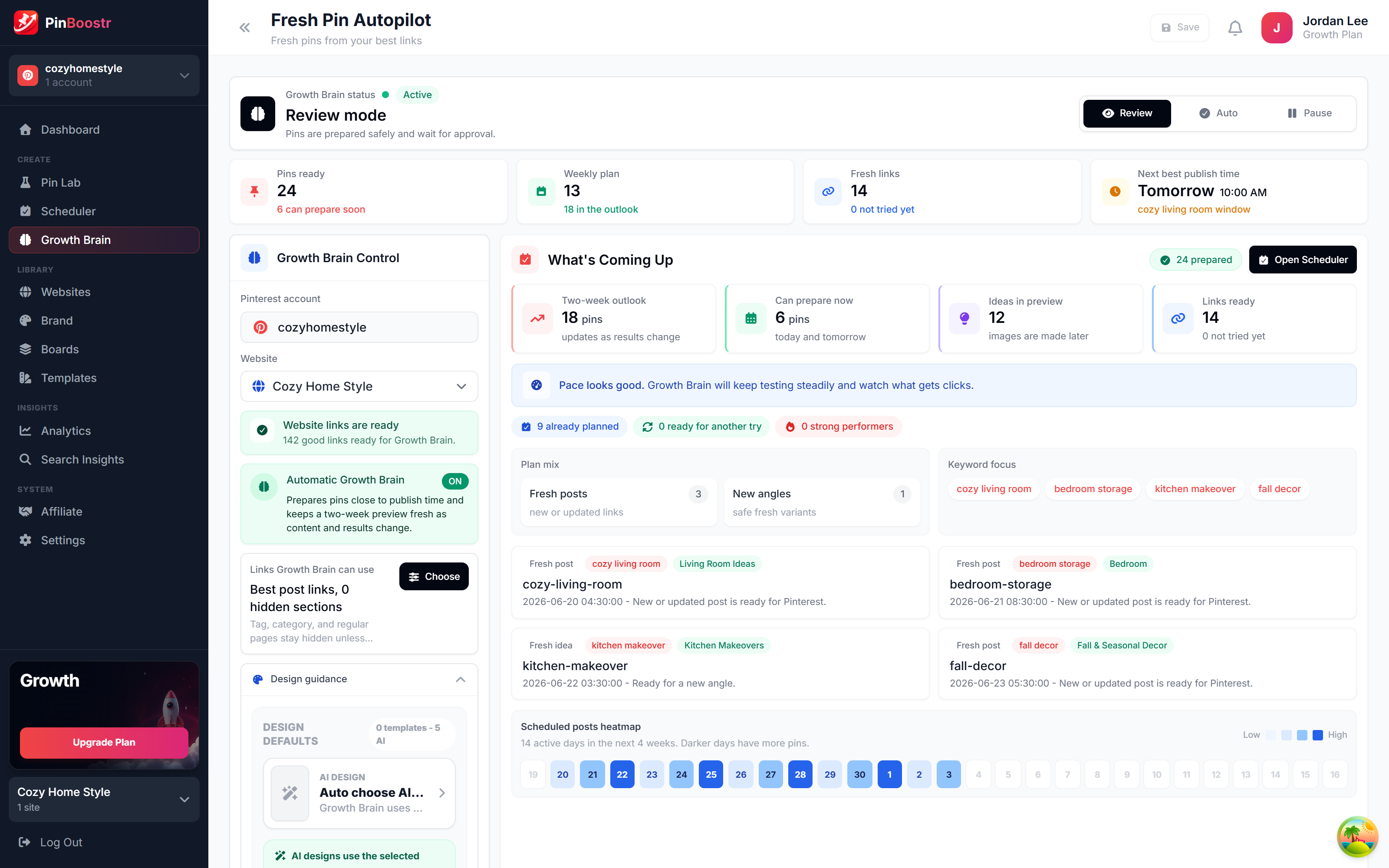
PinBoostr's Growth Brain scores your site, picks your best pages, and prepares the pins and copy for your review. You approve each pin, and approved pins publish through the official Pinterest API, spaced across the week. Scheduling never uses per-pin credits.

Best for: Creators who want Pinterest growth without designing every pin.

Pros

  • Suggests what to publish, then creates the pins for you
  • You approve each pin before it posts
  • Built-in keyword research
  • Works with any site + browser extension

Cons

  • No free plan, only a 1-month trial
  • No Instagram or Facebook scheduling
Start with PinBoostr free

2. BlogToPin

Best high-volume automation

$25/mo · Free basic pins, no trial

BlogToPin auto-generates and schedules pins from your connected websites at high volume (35 pins a day on Starter), with unlimited accounts and websites on every plan.

Best for: Creators and agencies automating many sites.

Pros

  • Unlimited accounts and websites
  • High daily pin limits
  • AI board matching

Cons

  • No refunds, per its FAQ
  • No free trial
Read the full PinBoostr vs BlogToPin comparison

3. Tailwind

Best automation suite

$29.99/mo · Starts free (limits not listed)

Tailwind automates timing with SmartSchedule and can auto-build weekly pins with SmartPin, on credit-based plans priced per Pinterest account.

Best for: Hands-on pinners who want SmartPin and Communities.

Pros

  • SmartSchedule + SmartPin
  • Communities reach network
  • Long-standing Pinterest partner

Cons

  • Credit-based
  • Priced per Pinterest account
Read the full PinBoostr vs Tailwind comparison

4. Pin Generator

Best AI pin + video

$29.99/mo · Free preview pins

Pin Generator automates AI pin and video creation from URLs and schedules the output on credit-based plans.

Best for: Creators who want automated AI pins, including video.

Pros

  • AI pin and video generation
  • Etsy and Shopify product imports
  • Canva imports

Cons

  • Credit-based
  • You drive the generation
Read the full PinBoostr vs Pin Generator comparison

5. Pinpress

Lowest-cost AI pins

$12/mo yearly · 7-day trial

Pinpress turns a pasted blog URL into pin designs in your brand colors and posts them to your boards. Pro is $12 a month billed yearly ($144 a year) with 50 credits a month.

Best for: Bloggers who want cheap AI pins from single URLs.

Pros

  • Low yearly price
  • Unlimited Pinterest accounts and boards
  • Retries failed pins

Cons

  • 50 credits a month on Pro
  • No WordPress sync named

6. Pinterest's own tools

Best free option

Free · Free

Pinterest itself can schedule Pins up to 30 days ahead (up to 10 at a time), bulk-create up to 200 Pins from a CSV file, and auto-publish new posts from an RSS feed on your claimed website (up to 200 Pins a day).

Best for: Anyone starting out who already has pin images.

Pros

  • Free and built in
  • RSS auto-publish for claimed sites
  • CSV bulk upload

Cons

  • Does not design pins or write copy
  • RSS pins reuse your feed image

7. dlvr.it

Best RSS auto-poster

See vendor site · See vendor site

dlvr.it watches your sites and RSS feeds and auto-posts new items to Pinterest and other social profiles, so every new post goes out without a manual step.

Best for: Publishers who want new posts shared everywhere at once.

Pros

  • Feed and RSS based
  • Posts to many networks
  • Long-running service

Cons

  • Does not design pins
  • Pinterest is one network of many

8. Later

Best scheduling automation

$18.75/mo yearly · 14-day trial

Later automates publishing across eight networks with a strong visual calendar, though you bring the pins.

Best for: Visual planners automating several networks.

Pros

  • Best visual calendar
  • Multi-platform auto-publish

Cons

  • No pin generation
  • No permanent free plan
Read the full PinBoostr vs Later comparison

9. Metricool

Best with analytics

$25/mo · Free plan: 20 posts/mo

Metricool automates scheduling and pairs it with cross-network analytics and ads management. Its free plan schedules up to 20 posts a month for 1 brand.

Best for: Creators who want automation plus reporting.

Pros

  • Strong analytics
  • Ads management
  • Free plan

Cons

  • Does not create pins
  • Pinterest features lighter
Read the full PinBoostr vs Metricool comparison

See it in action

PinBoostr, behind the scenes

Pinterest reaches 640 million monthly users (Pinterest, Q2 2026). Here is how PinBoostr helps you reach them — it prepares the pins, you approve them, and they publish on a steady schedule.

PinBoostr Growth Brain suggesting your best content for new pins
Growth Brain suggests your best content
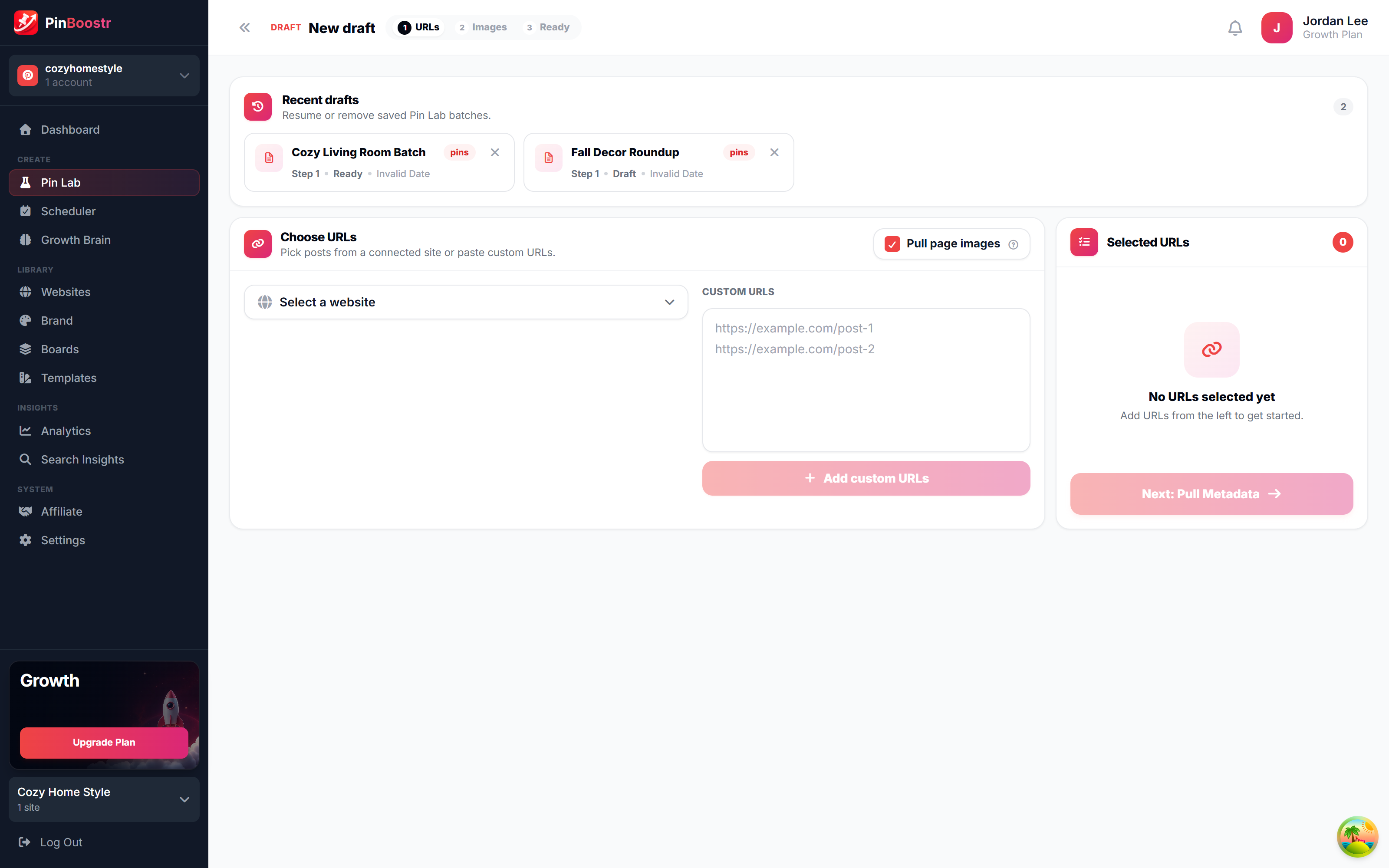
PinBoostr Pin Lab editor creating a branded Pinterest pin
Pin Lab generates branded pins
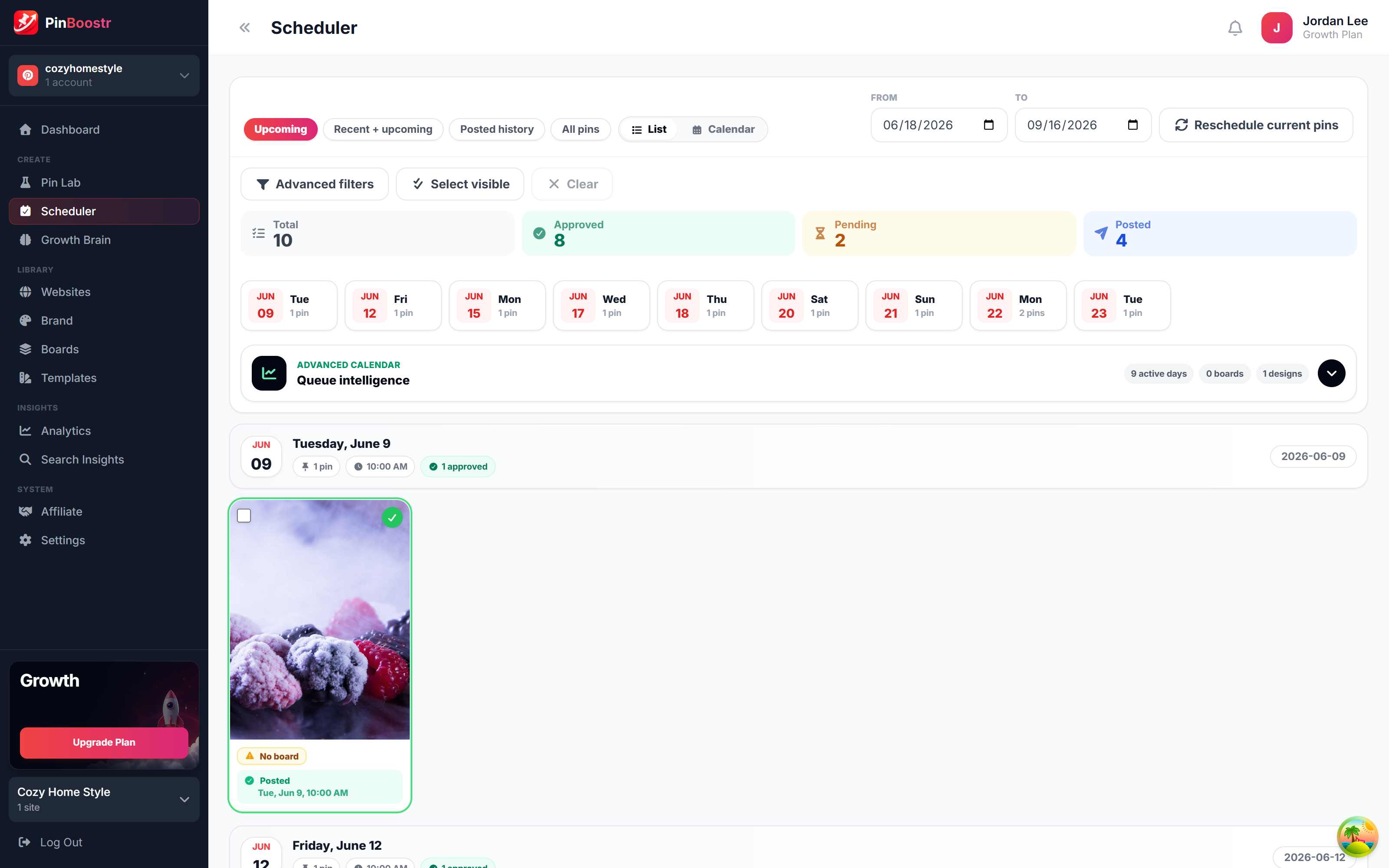
PinBoostr scheduler queue publishing approved pins through the official Pinterest API
The scheduler publishes approved pins

Best Pinterest Automation Tools FAQ

What is the best Pinterest automation tool in 2026?

PinBoostr is the best for most creators because its Growth Brain suggests what to publish, creates the pins, and publishes the ones you approve on a paced schedule. BlogToPin is the high-volume option for many sites, Tailwind the most established automation suite, and Pin Generator the best for automated AI video pins.

What does Pinterest automation actually do?

It can range from scheduling pins you made (Later, Metricool, Buffer) to generating pins for you (PinBoostr, BlogToPin, Pin Generator). The most advanced, like PinBoostr's Growth Brain, also suggest what to publish and pace posting to help protect your account.

Is Pinterest automation safe?

Generally, yes — when the tool uses the official Pinterest API rather than your password and paces activity naturally. Every third-party tool here publishes through the official API; PinBoostr has you approve every pin and adds per-URL, per-board and per-keyword caps plus gradual account warm-up. See our dedicated guide on whether Pinterest automation is safe.

Which automation tool creates pins for me?

PinBoostr, BlogToPin, Pin Generator, Pinpress and Tailwind (via Create/SmartPin) can generate pins. PinBoostr goes furthest by scoring your site to suggest what to publish and pacing the pins you approve. Pinterest's own scheduler, dlvr.it, Later and Metricool publish pins but do not design them.

Is there a free Pinterest automation tool?

Yes. Pinterest itself is free: it schedules Pins up to 30 days ahead, bulk-uploads up to 200 Pins from a CSV file and auto-publishes from your RSS feed. It does not design pins or write copy. PinBoostr does both, and its 1-month free trial needs no credit card: up to 3 pins a day plus 30 AI text credits and 15 AI images.

How much do Pinterest automation tools cost?

In October 2026 entry plans ran from free (Pinterest's own scheduler and RSS auto-publish) to about $30 a month: PinBoostr from $19.99, BlogToPin $25, Tailwind and Pin Generator $29.99 billed monthly, and Pinpress $12 a month billed yearly. Several charge credits per pin or per AI action, so compare what a month of your normal posting would really cost.

Can I automate Pinterest from WordPress?

Yes. PinBoostr has a WordPress connector that auto-syncs new posts into branded pins, and works with any site plus a one-click browser extension. See our guide on how to turn WordPress posts into Pins.

Skip the comparison shopping

PinBoostr creates your pins and optimizes the keywords, then publishes the ones you approve to Pinterest — try it free and see the difference.

Try PinBoostr free

No credit card required.