One-time deal

1 year of PinBoostr $0.27 $0.14/day $49.99 paid once Save 50%

Ends in --d --h --m --s
Only 1 of 5 left Get the deal
PinBoostr
Roundup by the PinBoostr team · updated October 2026

Best Pinterest Scheduling Tools (2026)

The best Pinterest scheduling tools in 2026 are PinBoostr (makes pins from your site and schedules the ones you approve), Tailwind (the established Pinterest suite), Later (visual calendar), Metricool (best free plan with analytics), Buffer (simplest free plan), Planoly (visual planning), Hootsuite (teams) and Pinterest's own scheduler (free, up to 10 pins at a time). Metricool, Buffer and Planoly have real free plans; PinBoostr, Later and Hootsuite offer free trials instead.

Disclosure: PinBoostr is our product, so we are not a neutral reviewer. Competitor details come from their public sites; check current terms before you buy.

Our 2026 ranking

Pinterest
  1. 1 PinBoostr Best for done-for-you pins Top pick
  2. 2 Tailwind Best established suite
  3. 3 Later Best visual scheduler
  4. 4 Metricool Best free plan + analytics
  5. 5 Buffer Simplest free scheduler
  6. 6 Planoly Best visual planning
  7. 7 Hootsuite Best for teams
  8. 8 Pinterest native scheduler Best free baseline

The quick verdict

Best Pinterest Scheduling Tools at a glance

Every third-party tool here posts to Pinterest through the official Pinterest API, and Pinterest's own scheduler is built into Pinterest. So the useful differences are price, whether there is a real free plan, and how much of the pin creation the tool does for you. Prices below were read from each vendor's own pricing page in October 2026.

Our pick

PinBoostr

Best for done-for-you pins

Tailwind

Best established suite

Later

Best visual scheduler

Metricool

Best free plan + analytics

Buffer

Simplest free scheduler

Planoly

Best visual planning

Hootsuite

Best for teams

Pinterest native scheduler

Best free baseline

Side by side

Best Pinterest Scheduling Tools compared

Pricing is current as of October 2026.

Tool Best for Networks Starts at Free plan? Official Pinterest API?
PinBoostr Pick Best for done-for-you pins Pinterest From $19.99/mo No. 1-month free trial, no card Yes
Tailwind Best established suite 1 $29.99/mo ($17.99 yearly) Starts free (limits not listed) Yes
Later Best visual scheduler 8 $18.75/mo yearly No. 14-day trial Yes
Metricool Best free plan + analytics 10+ $25/mo ($20 yearly) Yes: 1 brand, 20 posts/mo Yes
Buffer Simplest free scheduler Many $5/channel/mo Yes: 3 channels, 10 posts each Yes
Planoly Best visual planning Several $14/mo Yes, mobile app: 10 uploads/mo Yes
Hootsuite Best for teams Many From $99/mo No. 14-day trial Yes
Pinterest native scheduler Best free baseline 1 Free Yes, built in Built into Pinterest

Free Pinterest scheduler options in 2026

Yes, you can schedule pins for free. Pinterest's own scheduler costs nothing: with a free business account you can schedule a Pin up to 30 days ahead, with up to 10 Pins scheduled at a time.

Three tools in this list have a real free plan, checked October 2026. Metricool's covers 1 brand and 20 scheduled posts a month. Buffer's connects up to 3 channels with 10 scheduled posts per channel. Planoly's free plan runs on its mobile app with 10 uploads a month.

Tailwind lets you start free without a card, but its pricing page does not list the free limits. Later and Hootsuite have 14-day trials, not free plans. PinBoostr has no free plan either: it has a 1-month free trial with no card, then plans from $19.99 a month with a 14-day refund.

A free plan is enough if you design your own pins and post a few a week. If you want the pins made for you, see how the PinBoostr Pinterest scheduler spaces out the pins you approve. For every free option and its exact limits, see the best free Pinterest schedulers.

Pinterest approved schedulers: what "approved" really means

We found no list from Pinterest called "approved schedulers." Two different things get described that way, and they are worth keeping apart.

The first is API access. Any app that posts to Pinterest through its official API needs Pinterest to grant that access, and you connect it on Pinterest's own login screen instead of handing over your password. That is how every third-party tool in this list posts.

The second is the Pinterest Business Partners directory. Pinterest says its partners "have been vetted for their technical expertise and Pinterest knowledge," and its Content category covers tools such as Pin schedulers. In October 2026 the directory had partner pages for Tailwind and Buffer. A listing is a business relationship with Pinterest; it does not mean Pinterest reviews each pin a tool posts.

PinBoostr is not a Pinterest Business Partner. It publishes through the official Pinterest API, and you approve each pin before it posts. To check any scheduler, connect it and confirm you are sent to Pinterest to grant access, and never give a tool your Pinterest password.

Our recommended pick

1. PinBoostr

Best for done-for-you pins

From $19.99/mo · No. 1-month free trial, no card

PinBoostr turns your site into pins and schedules them. Its Growth Brain engine picks the pages worth pinning, prepares branded pins with keyword-led titles, and publishes the ones you approve through the official Pinterest API, spaced across the week. Scheduling never uses per-pin credits.

Best for: Creators who want pin creation and scheduling handled, with a quick review before anything posts.

Pros

  • Creates the pins, not just schedules them
  • You approve each pin before it posts
  • Built-in Pinterest keyword research
  • 14-day refund on any purchase or renewal

Cons

  • No free plan, only a 1-month trial
  • No Instagram or Facebook scheduling
See the PinBoostr Pinterest scheduler Start with PinBoostr free

2. Tailwind

Best established suite

$29.99/mo ($17.99 yearly) · Starts free (limits not listed)

Tailwind is the established Pinterest suite, with SmartSchedule timing, Tailwind Create and SmartPin. Since September 2026 new plans are Pinterest-only and paid in credits: Pin Scheduling & Creation is $29.99 a month, or $17.99 a month billed yearly, with 300 credits a month. SEO and Engagement are separate add-ons.

Best for: Hands-on pinners who want the best-known Pinterest tool.

Pros

  • SmartSchedule timing
  • Start free with no card
  • Listed in the Pinterest Business Partners directory

Cons

  • Credit-based pricing
  • Priced per Pinterest account
Read the full PinBoostr vs Tailwind comparison

3. Later

Best visual scheduler

$18.75/mo yearly · No. 14-day trial

Later offers a visual drag-and-drop calendar across eight networks, Pinterest included, plus analytics and a link-in-bio tool. Starter is $18.75 a month billed yearly, and each paid plan starts with a 14-day free trial.

Best for: Visual planners scheduling several networks.

Pros

  • Clear visual calendar
  • Pinterest analytics and click tracking

Cons

  • No permanent free plan
  • Pinterest is one network of many
Read the full PinBoostr vs Later comparison

4. Metricool

Best free plan + analytics

$25/mo ($20 yearly) · Yes: 1 brand, 20 posts/mo

Metricool pairs scheduling with cross-network analytics and ads management. Its free plan covers 1 brand and 20 scheduled posts a month with 30 days of analytics; Starter is $25 a month, or $20 a month billed yearly.

Best for: Creators who want a free plan and analytics across many networks.

Pros

  • Useful free plan
  • Strong analytics and reporting
  • Built-in ads management

Cons

  • Does not create pins
  • Pinterest features lighter than specialists
Read the full PinBoostr vs Metricool comparison

5. Buffer

Simplest free scheduler

$5/channel/mo · Yes: 3 channels, 10 posts each

Buffer is a clean, beginner-friendly scheduler priced per channel, Pinterest included. The free plan connects up to 3 channels with 10 scheduled posts per channel; Essentials is $5 per channel a month.

Best for: Solo creators who want simple cross-posting.

Pros

  • Very easy to learn
  • Free plan for light posting
  • Low per-channel cost

Cons

  • Light on Pinterest-specific features
  • No pin creation
Read the full PinBoostr vs Buffer comparison

6. Planoly

Best visual planning

$14/mo · Yes, mobile app: 10 uploads/mo

Planoly pioneered grid planning and schedules Instagram, Pinterest and other networks with a polished visual preview. Starter is $14 a month with a 14-day trial, and a free plan on the mobile app includes 10 uploads a month.

Best for: Creators who plan content visually across networks.

Pros

  • Visual grid planning
  • Free mobile plan

Cons

  • You bring the visuals
  • Starter covers 1 social set
Read the full PinBoostr vs Planoly comparison

7. Hootsuite

Best for teams

From $99/mo · No. 14-day trial

Hootsuite is the enterprise suite with approval workflows, social listening and advanced analytics across many networks. Its FAQ puts Standard at $99, and every paid plan starts with a 14-day trial.

Best for: Agencies and teams managing many channels.

Pros

  • Robust team workflows
  • Advanced analytics and listening

Cons

  • Expensive for individuals
  • Trials have daily posting limits

8. Pinterest native scheduler

Best free baseline

Free · Yes, built in

Pinterest's own scheduler is free for business accounts. You can schedule a Pin up to 30 days ahead and have up to 10 Pins scheduled at a time, with no third-party access.

Best for: Light users who publish a few pins a week at zero cost.

Pros

  • Free and first-party
  • No third-party account access

Cons

  • Only 10 Pins can be scheduled at once
  • No bulk, AI, design or analytics help

See it in action

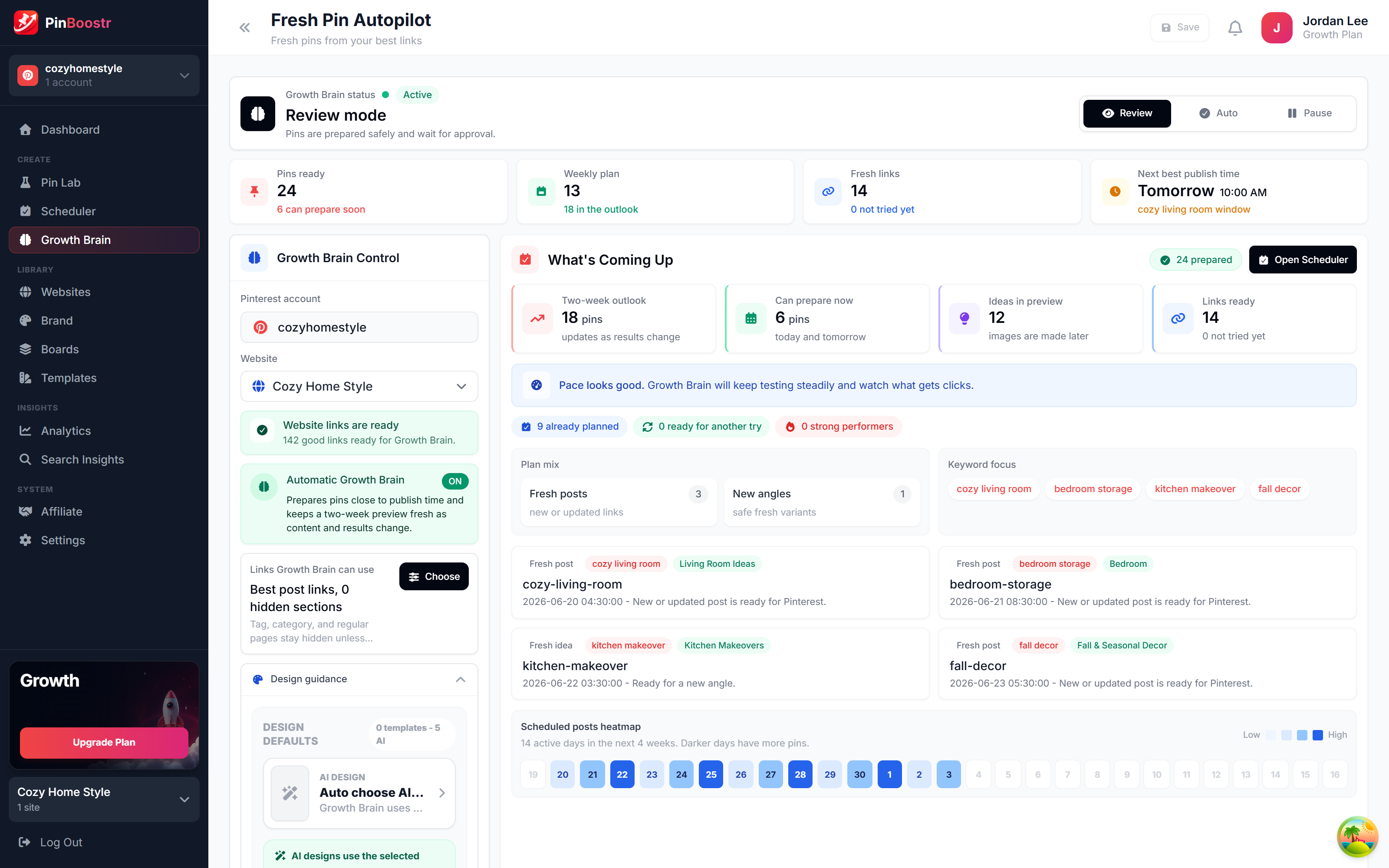
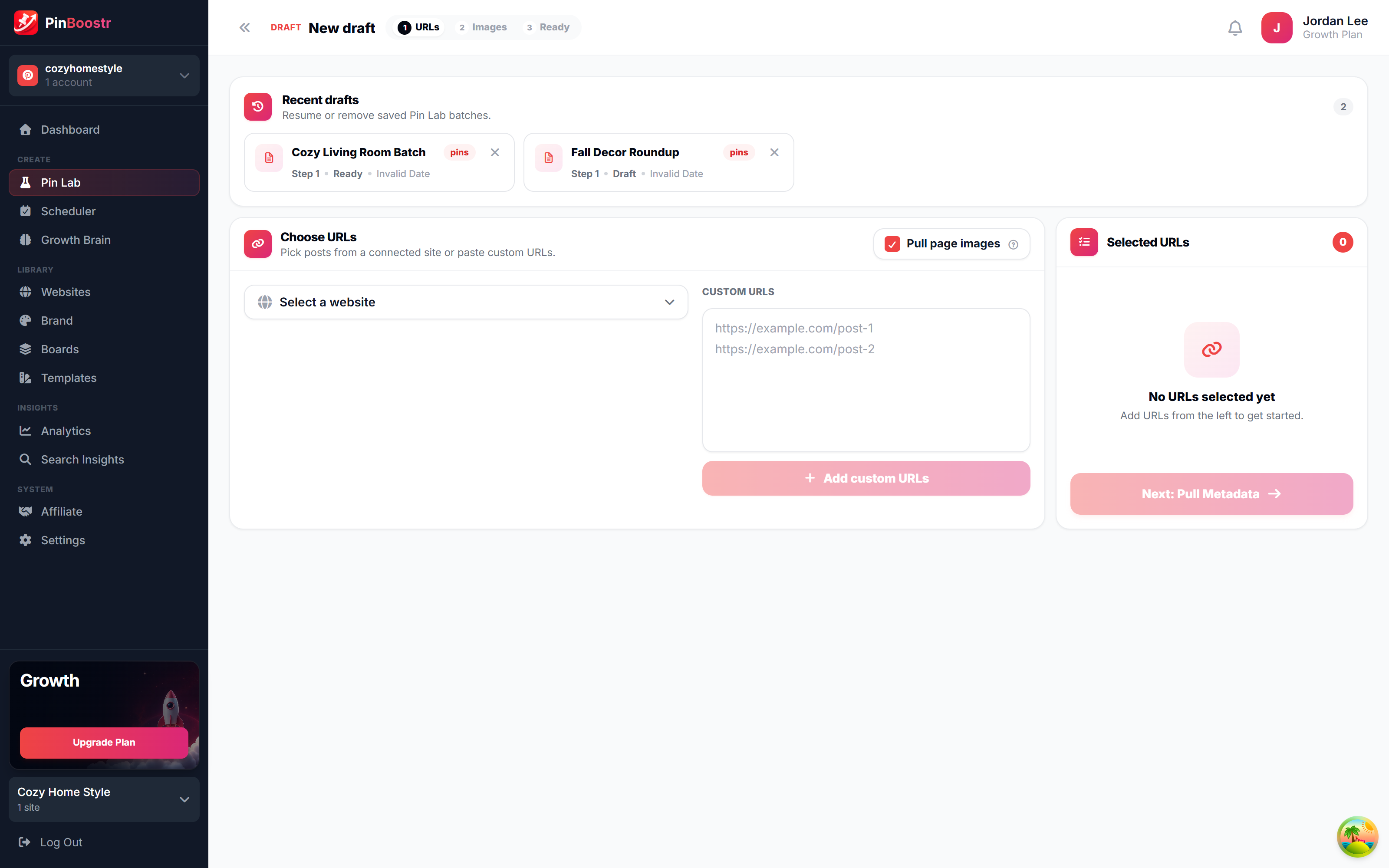
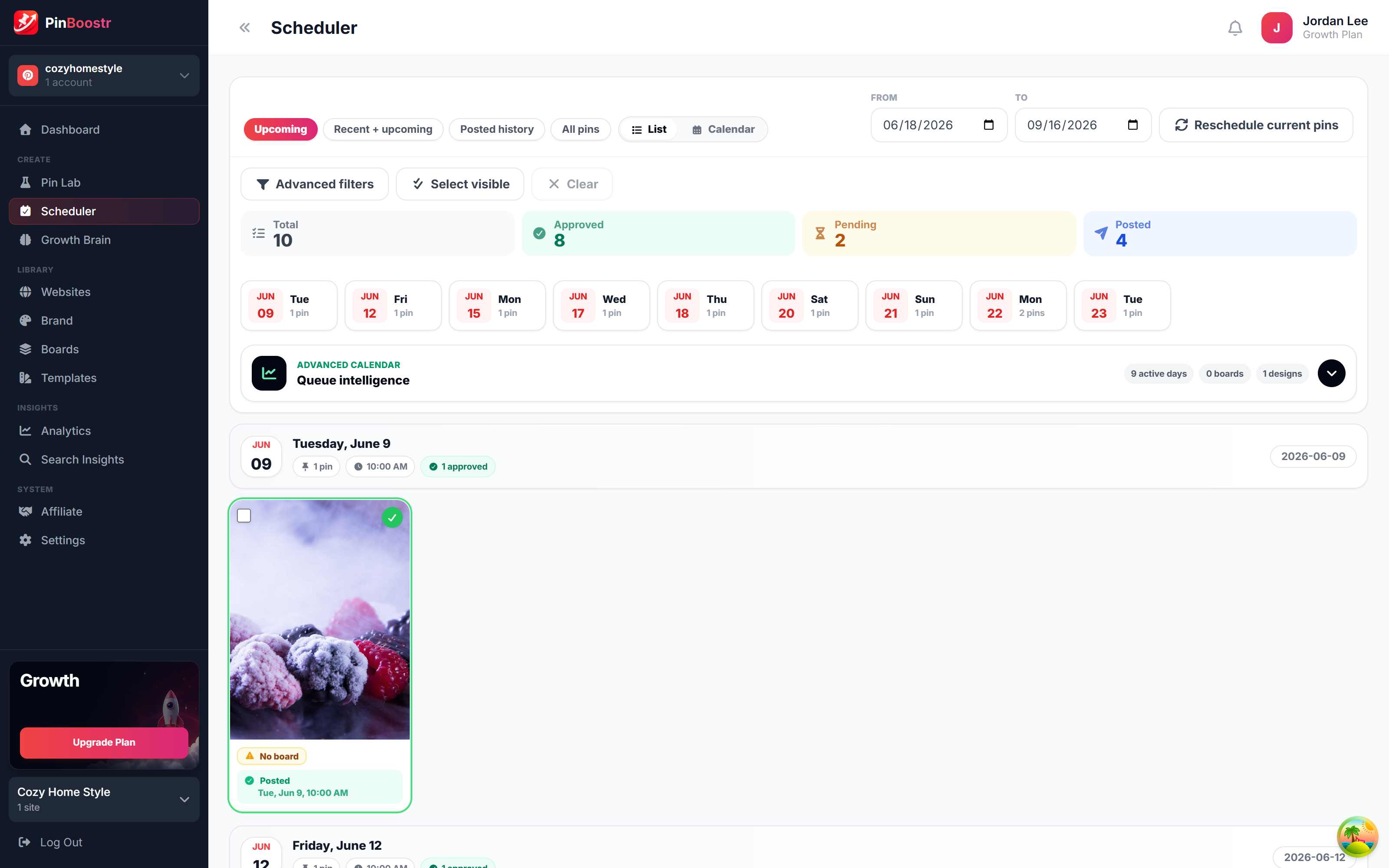
PinBoostr, behind the scenes

Pinterest reaches 640 million monthly users (Pinterest, Q2 2026). Here is how PinBoostr helps you reach them — it prepares the pins, you approve them, and they publish on a steady schedule.

PinBoostr Growth Brain suggesting your best content for new pins
Growth Brain suggests your best content
PinBoostr Pin Lab editor creating a branded Pinterest pin
Pin Lab generates branded pins
PinBoostr scheduler queue publishing approved pins through the official Pinterest API
The scheduler publishes approved pins

Best Pinterest Scheduling Tools FAQ

What is the best Pinterest scheduling tool in 2026?

PinBoostr is the best choice for most creators because it both creates your pins and schedules the ones you approve through the official Pinterest API. Tailwind is the most established Pinterest suite, Later has the best visual calendar, and Metricool has the best free plan with analytics.

What is the best free Pinterest scheduler?

Pinterest's own scheduler is free and holds up to 10 Pins up to 30 days ahead. For more, Metricool's free plan schedules 20 posts a month, Buffer's covers 3 channels with 10 scheduled posts each, and Planoly's mobile plan includes 10 uploads a month. PinBoostr has a 1-month free trial with no card, not a free plan.

Which Pinterest schedulers are approved by Pinterest?

We found no Pinterest list of approved schedulers. Tools that post through the official Pinterest API have API access granted by Pinterest, and some, such as Tailwind and Buffer, also appear in the Pinterest Business Partners directory. PinBoostr uses the official API but is not a Pinterest partner.

How many pins can you schedule on Pinterest?

With Pinterest's own scheduler you can have up to 10 Pins scheduled at a time, up to 30 days ahead. Third-party schedulers set their own limits by plan, so check the plan before you buy.

Which Pinterest scheduler also creates the pins?

PinBoostr goes furthest: Growth Brain turns your site into branded pins for you to approve, then schedules them. Tailwind can also create pins with Tailwind Create and SmartPin on its credit-based plans. The others mostly schedule pins you design elsewhere.

Is it safe to schedule Pinterest pins with a tool?

Scheduling through the official Pinterest API is the supported way to post from another app, and every third-party tool here uses it. Avoid any tool that asks for your Pinterest password, and pace your pins; see our guide on whether Pinterest automation is safe for details.

Skip the comparison shopping

PinBoostr creates your pins and optimizes the keywords, then publishes the ones you approve to Pinterest — try it free and see the difference.

Try PinBoostr free

No credit card required.