Limited-time offer Starter for $1.99 your first month, then $19.99/mo Claim offer
Roundup by the PinBoostr team · updated June 2026

Best LinkedIn Automation Tools (2026)

The best LinkedIn automation tools split into two groups. Publishing tools — PinBoostr (free), Buffer, Typefully and Hootsuite — schedule posts through LinkedIn's official API, which LinkedIn permits. Outreach tools — Expandi, Dripify, Dux-Soup and Octopus CRM — auto-connect and auto-message through your browser session, which LinkedIn's User Agreement prohibits and restricts accounts for. Pick your group before you pick your tool.

Disclosure: PinBoostr is our product, so we are not a neutral reviewer. Competitor details come from their public sites; check current terms before you buy.

Our 2026 ranking

LinkedIn
  1. 1 PinBoostr Best free option Top pick
  2. 2 Buffer Simplest scheduler
  3. 3 Typefully Best writing experience
  4. 4 Hootsuite Best for teams
  5. 5 Taplio Biggest feature set
  6. 6 Expandi Best known outreach tool
  7. 7 Dripify Sequence builder
  8. 8 Dux-Soup Cheapest outreach

The quick verdict

Best LinkedIn Automation Tools at a glance

Most roundups list these eight together as if they were interchangeable. They are not: half of them publish through the official API and half of them act as you inside your own browser session. The Method column is the one that decides whether your account is at risk, so it comes first here.

Our pick

PinBoostr

Best free option

Buffer

Simplest scheduler

Typefully

Best writing experience

Hootsuite

Best for teams

Taplio

Biggest feature set

Expandi

Best known outreach tool

Dripify

Sequence builder

Dux-Soup

Cheapest outreach

Side by side

Best LinkedIn Automation Tools compared

Pricing is current as of June 2026.

Tool Best for Method Starts at Free
PinBoostr Pick Best free option Official API Free in beta Every account
Buffer Simplest scheduler Official API $5/channel Free plan
Typefully Best writing experience Official API $12.50/mo Free plan
Hootsuite Best for teams Official API $99/mo 30-day trial
Taplio Biggest feature set API + extension $39/mo 7-day trial
Expandi Best known outreach tool Browser session $99/mo 7-day trial
Dripify Sequence builder Browser session $39/mo 7-day trial
Dux-Soup Cheapest outreach Chrome extension From $14.99/mo Free tier
Our recommended pick

1. PinBoostr

Best free option

Free in beta · Every account

PinBoostr automates the half LinkedIn allows: it publishes posts you wrote and approved, through the official API, with one posting permission and no browser extension. You draft by hand or with AI trained on your own past posts, design carousel decks in a built-in studio, and drop everything into weekly posting-time slots. It also runs a full Pinterest engine from the same dashboard.

Best for: Creators, founders and small teams who want consistent posting without an extension touching their account.

Pros

  • Free for every account while LinkedIn is in beta
  • Official API only — nothing to revoke but a token
  • Carousel studio with PDF export built in
  • Pinterest and LinkedIn from one login

Cons

  • No outreach or lead generation, by design
  • Personal profiles only, not company pages
  • LinkedIn module is still in beta
Start with PinBoostr free

2. Buffer

Simplest scheduler

$5/channel · Free plan

Buffer is the plain, cheap, per-channel scheduler across every major network including LinkedIn. No growth-hacking layer, no extension acting for you — you queue posts and it publishes them.

Best for: Anyone who wants scheduling across several networks with no learning curve.

Pros

  • Genuinely usable free plan
  • Official API on every network
  • Cheapest paid tier per channel

Cons

  • No LinkedIn-specific features
  • No carousel designer
  • Shallow analytics
Read the full PinBoostr vs Buffer comparison

3. Typefully

Best writing experience

$12.50/mo · Free plan

A distraction-free composer that started on X and brought scheduling and simple analytics to LinkedIn. Nothing automated beyond the clock.

Best for: Writers posting to both X and LinkedIn who want one calm place to draft.

Pros

  • Best pure writing interface
  • Cross-posts to X cleanly
  • Free plan for light use

Cons

  • No carousel designer
  • Light LinkedIn analytics
  • Fewer team features

4. Hootsuite

Best for teams

$99/mo · 30-day trial

The enterprise social suite: approval workflows, roles and permissions, a unified inbox and reporting across every network a client uses.

Best for: Agencies and larger teams that need approvals and client reporting.

Pros

  • Real approval workflows
  • Unified inbox across networks
  • Deep reporting

Cons

  • Priced for teams, not creators
  • Heavy for one person
  • Generic LinkedIn features

5. Taplio

Biggest feature set

$39/mo · 7-day trial

The most complete LinkedIn suite: AI writer, a large viral-post database, carousel maker, analytics, a lead database, and a Chrome extension for engagement. Its scheduling uses the API; its engagement features run in your browser session.

Best for: Creators who want every feature in one place and will manage the extension question themselves.

Pros

  • Enormous feature set
  • Strong post inspiration database
  • Built-in lead finder

Cons

  • Most expensive of the publishing group
  • Extension performs actions LinkedIn discourages
  • Users report warnings tied to the engagement features
Read the full PinBoostr vs Taplio comparison

6. Expandi

Best known outreach tool

$99/mo · 7-day trial

A cloud-based outreach platform that runs your LinkedIn session from a dedicated IP and sends connection requests and message sequences on your behalf, with smart delays meant to look human.

Best for: Sales teams running cold outreach who accept the account risk.

Pros

  • Dedicated IP and human-like pacing
  • Strong campaign and sequence builder
  • Well-supported and mature

Cons

  • Automated connecting and messaging is prohibited by the User Agreement
  • Account restrictions are a documented risk
  • Expensive for a solo user

7. Dripify

Sequence builder

$39/mo · 7-day trial

Cloud outreach with a visual drip-campaign builder: connect, wait, message, follow up, branch on replies, with a team dashboard on top.

Best for: Small sales teams who want outreach sequences without running a browser locally.

Pros

  • Clear visual campaign builder
  • Runs in the cloud, not on your machine
  • Team analytics

Cons

  • Same prohibited method as every outreach tool
  • No publishing or content features
  • Risk sits on the account, not the vendor

8. Dux-Soup

Cheapest outreach

From $14.99/mo · Free tier

One of the oldest LinkedIn extensions: it visits profiles, sends connection requests and messages, and exports data, all from Chrome while you are logged in.

Best for: Individuals who want the cheapest possible outreach automation.

Pros

  • Low entry price and a free tier
  • Long track record
  • Simple to start

Cons

  • Runs in your own browser session, the method LinkedIn prohibits
  • Your machine must stay open
  • Among the most commonly cited in restriction reports

See it in action

PinBoostr, behind the scenes

Pinterest reaches over 631 million monthly users (Pinterest, 2026). Here is how PinBoostr helps you reach them — create, schedule, and grow, automatically.

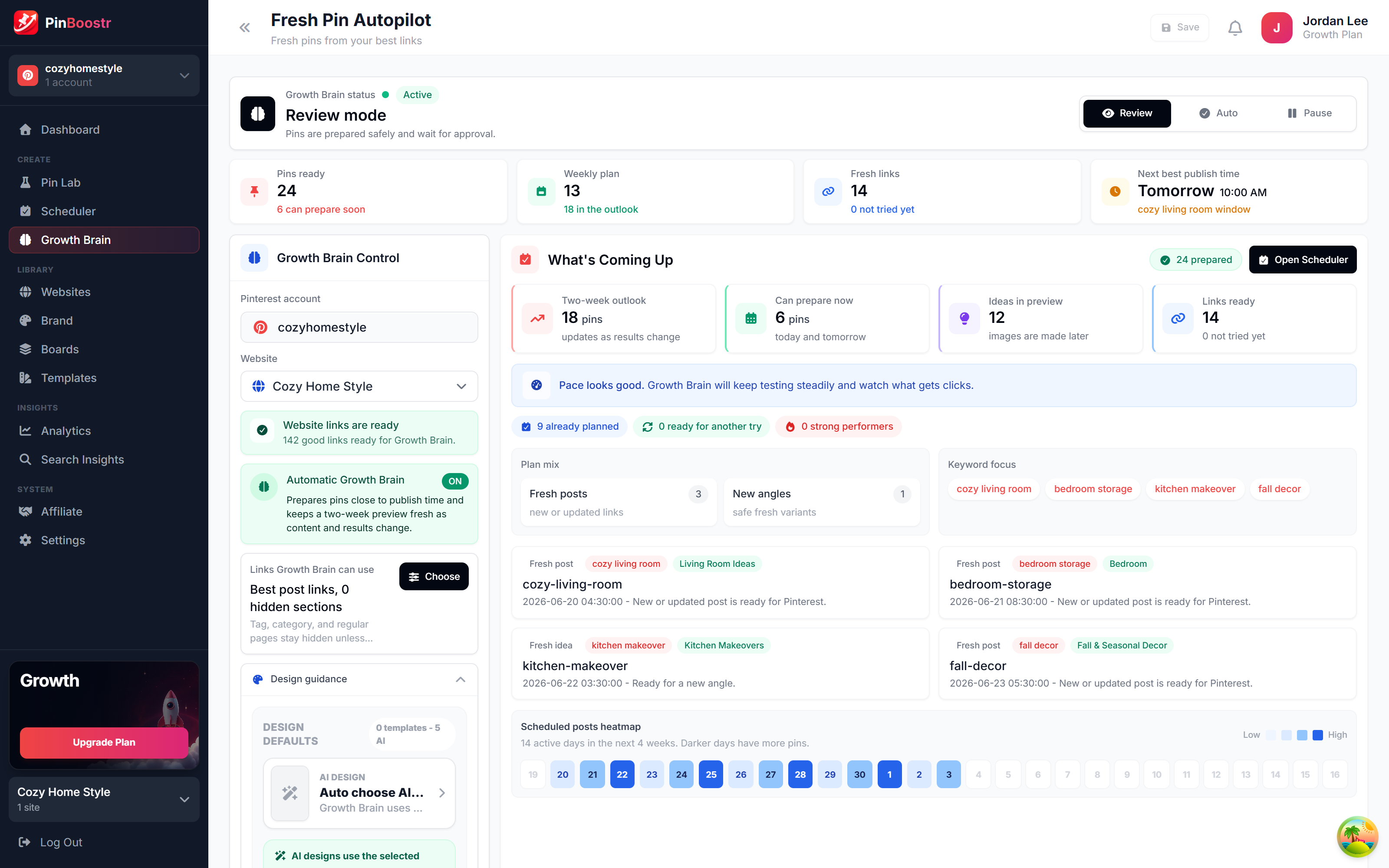
PinBoostr Growth Brain suggesting your best content for new pins
Growth Brain suggests your best content
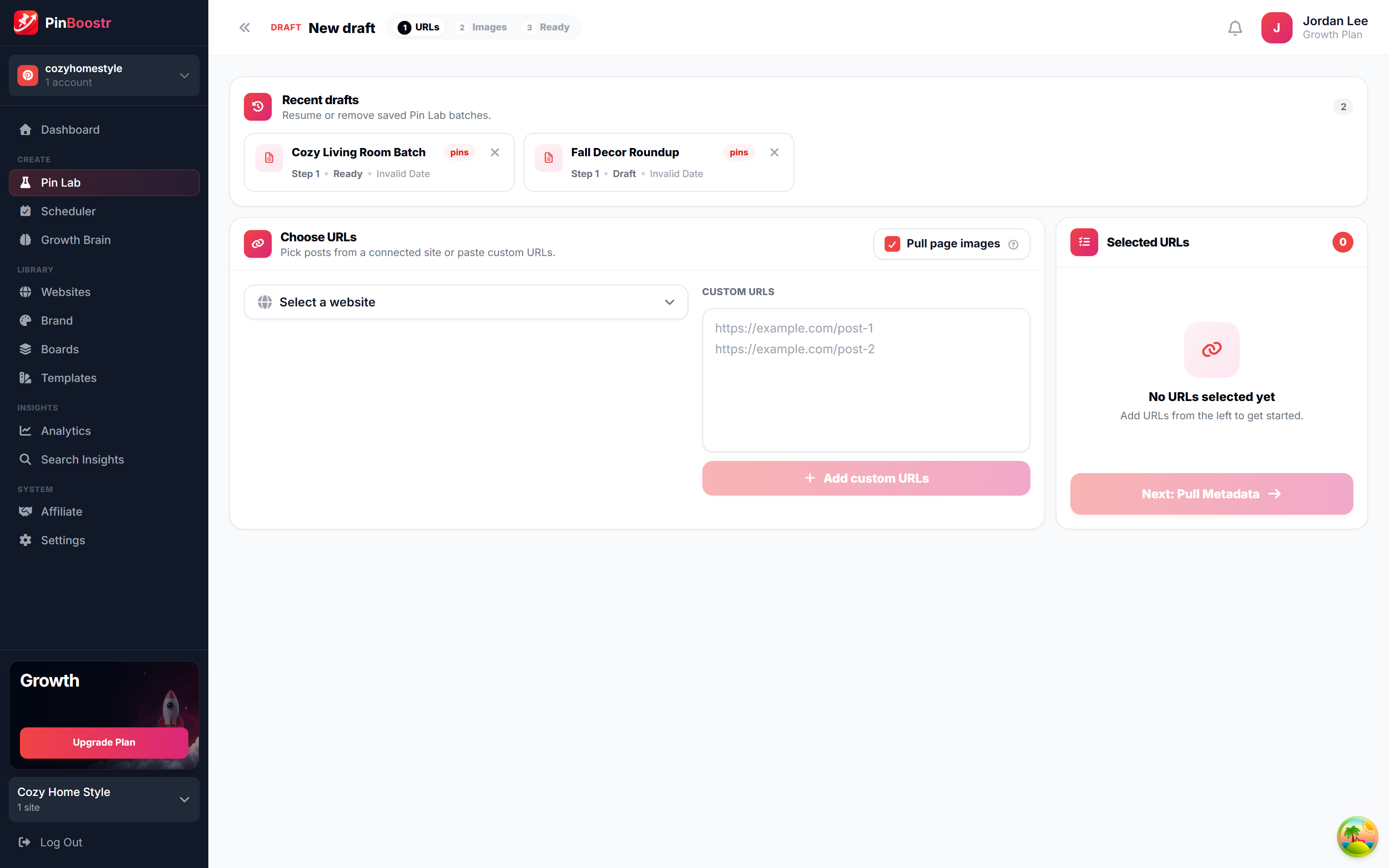
PinBoostr Pin Lab editor creating a branded Pinterest pin
Pin Lab generates branded pins
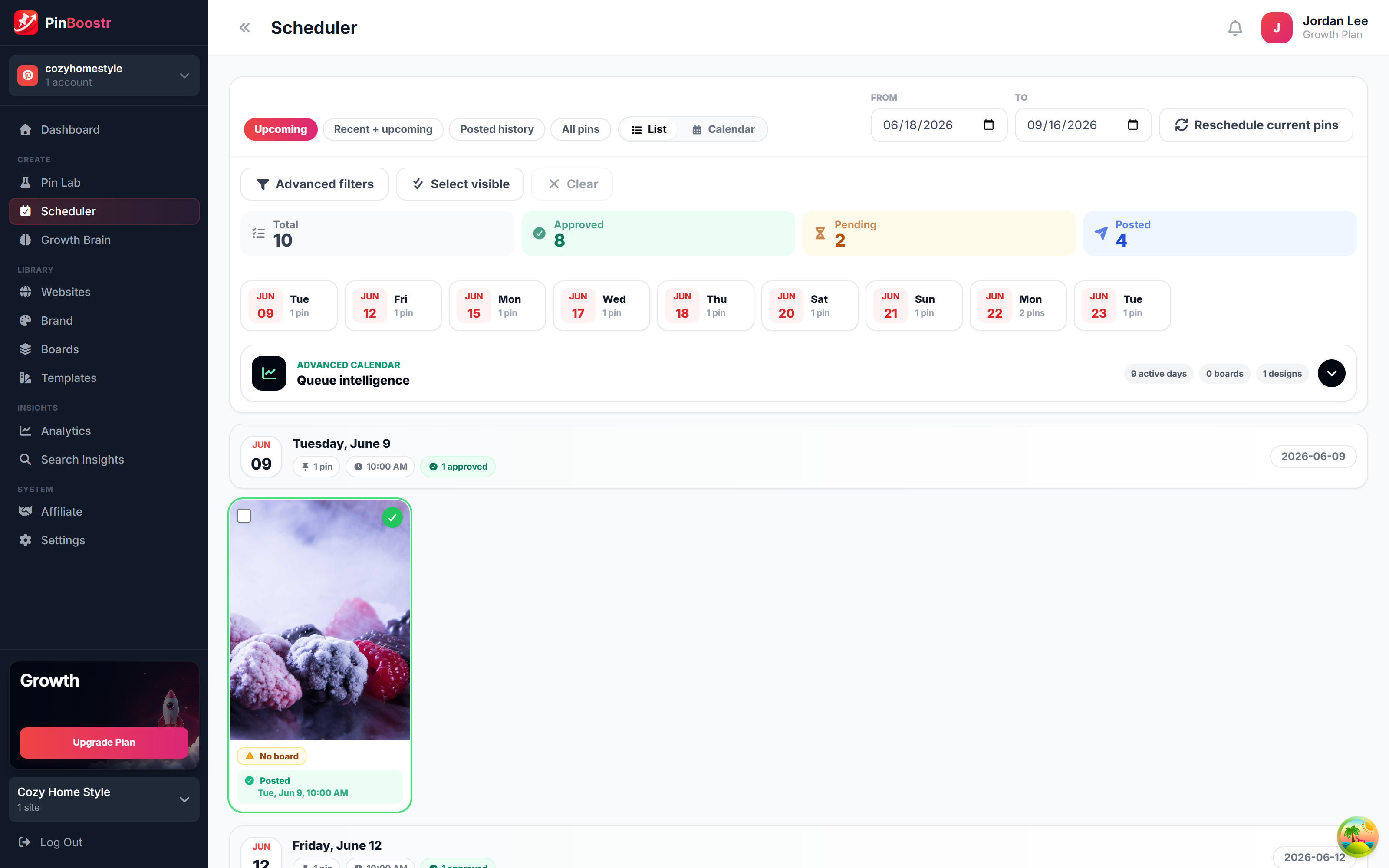
PinBoostr scheduler queue publishing approved pins through the official Pinterest API
The scheduler publishes approved pins

Best LinkedIn Automation Tools FAQ

What is the best LinkedIn automation tool?

It depends which half you mean. For publishing — scheduling posts through the official API — PinBoostr is the pick here because it is free while LinkedIn is in beta and needs no browser extension. For outreach, Expandi is the most mature, but every outreach tool uses a method LinkedIn prohibits, so the account risk is yours.

Are LinkedIn automation tools safe?

Publishing tools are: scheduling is supported by LinkedIn's API and LinkedIn ships its own scheduler. Outreach tools are not, whatever they claim. LinkedIn's User Agreement forbids software that sends automated actions on your behalf, and that is the category behind almost every restricted-account story.

Is there a free LinkedIn automation tool?

Yes. PinBoostr is free for every account while LinkedIn is in beta, Buffer and Typefully both have free plans, and LinkedIn's own scheduler costs nothing. Free outreach tools exist too, but free does not make the method permitted.

Can I automate LinkedIn connection requests?

Not within the rules. There is no official API for sending connection requests from a third-party app on a personal profile, so every tool offering it drives your logged-in browser session — the prohibited method. If outreach is your job, Sales Navigator and InMail are the supported routes.

Will LinkedIn ban me for using automation?

Scheduling posts, no. Automated connecting, messaging, profile-viewing or scraping is what draws warnings, temporary limits and, on repeat, permanent restrictions. The method matters more than the volume — there is no officially safe number.

Skip the comparison shopping

PinBoostr writes, designs and schedules your LinkedIn posts through the official API — and it is free for every account while LinkedIn is in beta.

Try PinBoostr free

No credit card required.