One-time deal

1 year of PinBoostr $99.99 $49.99 paid once Save 50%

Ends in --d --h --m --s
21 of 23 spots left Get the deal
PinBoostr

Turn any blog post or product page into a scheduled pin in seconds

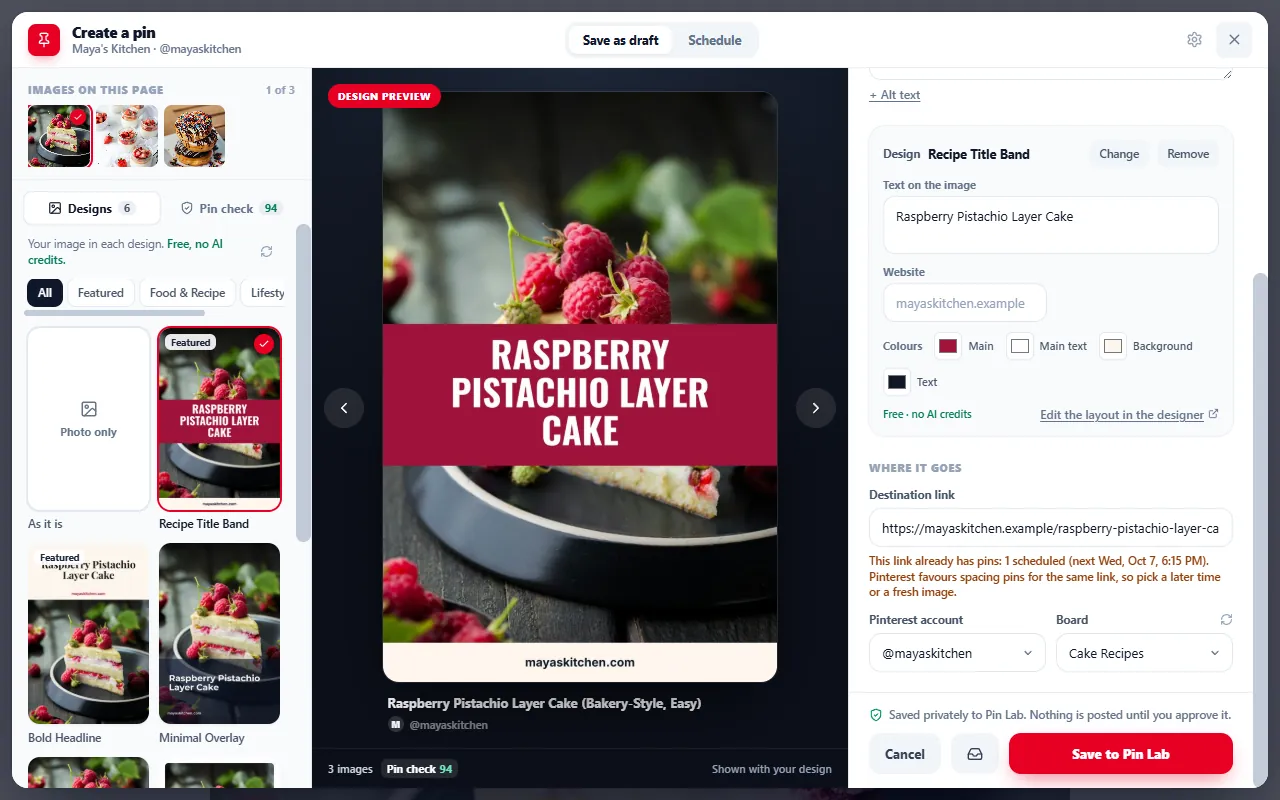
The PinBoostr Chrome extension is a Pinterest scheduler that lives in your toolbar. Open it on any page, pick an image, let AI write the title and description, and save a draft or schedule it to the board you choose. Nothing publishes until you approve it.

  • Free to install
  • Free plan: 20 pins a month, 30 AI writes to start
  • Official Pinterest API, you approve every pin
PinBoostr Chrome extension composer open on a recipe post, with the page's images, pin designs, a live pin preview, an AI-written title, the board picker and Save to Pin Lab
3ways to open it: the toolbar icon, a right-click on any image, or Alt+Shift+P
2ways to finish: a Pin Lab draft, or a scheduled pin
1page it can read: the one you clicked it on
0pins that publish without your approval
How it works

From an open tab to a scheduled pin in three steps

No copying links into a dashboard, no downloading images. The composer opens right on the page, with everything it found there.

  1. 1

    Open it on any page

    On a blog post or product page, click the PinBoostr icon, right-click an image and choose “Create a pin from this image”, or press Alt + Shift + P.

  2. 2

    Pick the image, write with AI

    Choose any image on the page. Edit the title, description and link yourself, or press Write with AI for an SEO title and description. Then pick the Pinterest account and board.

  3. 3

    Save a draft or schedule it

    Keep it as a Pin Lab draft to finish later, or schedule it, with one of your templates and a live preview if you like. You approve it, then it publishes through the official Pinterest API.

What’s inside

A pin maker for the pages you already have

Built for bloggers, shop owners and affiliate marketers who create pins from their own content.

AI copy & templates

An SEO title and description, written for you

Write with AI reads the page you are on and drafts a pin title and description around the words people search for. Every word stays yours to edit. The free plan includes 30 AI writes to start.

  • Your templates, with a live preview: turn the page image into a designed pin with one of your PinBoostr templates, and see exactly how it will look before you schedule it.
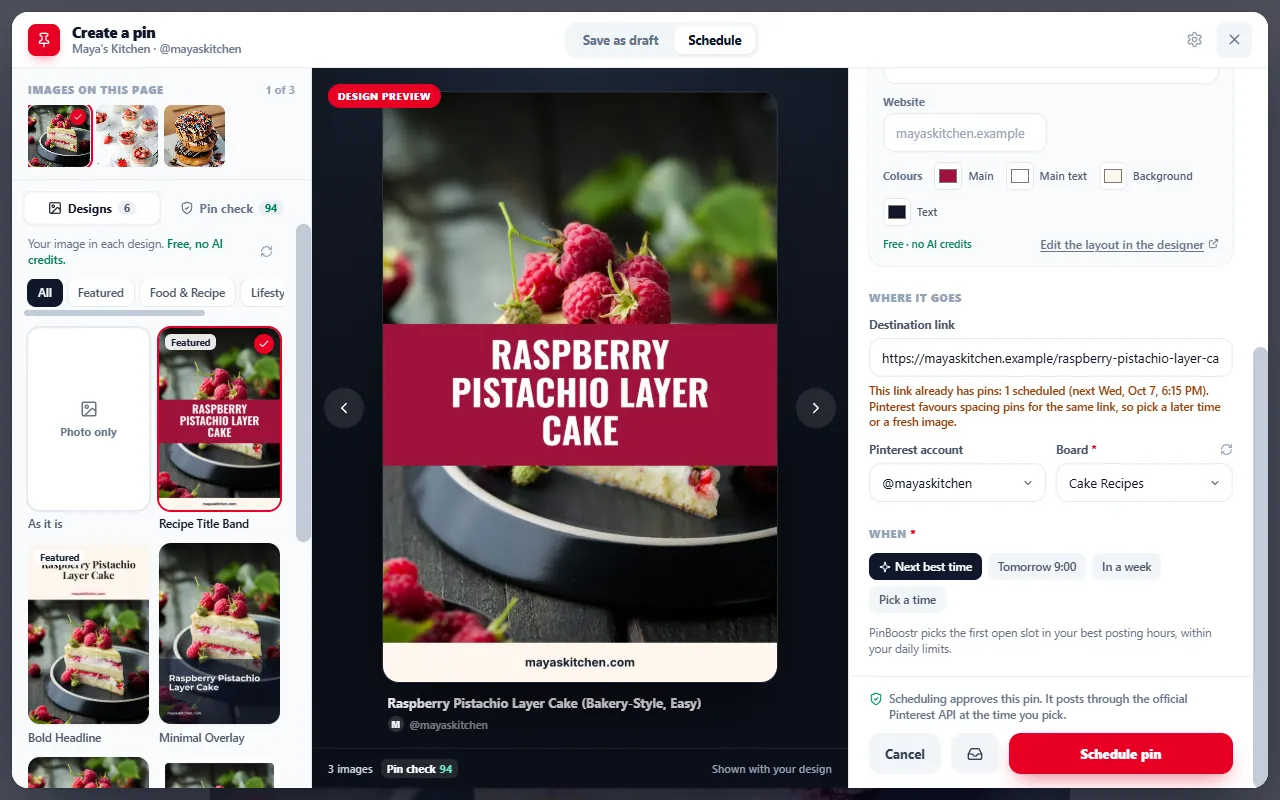
  • Pick the time, or let PinBoostr take the next best slot
  • A warning when a link already has pins, so you can space them out
Scheduling a pin from the PinBoostr extension: a designed pin preview, the destination link, Pinterest account, board and Next best time
Free Pin check

Check any page before you share it, no account needed

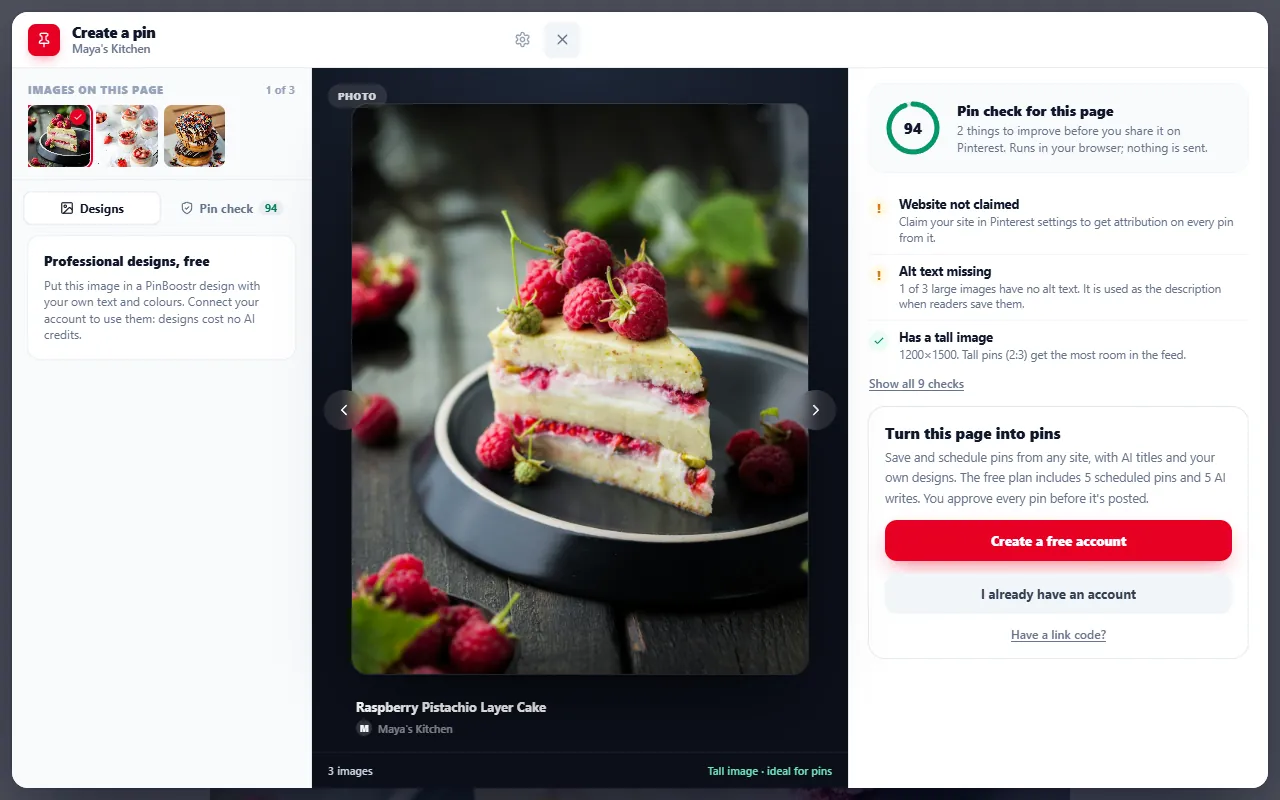
The Pin check looks at the page you are on and tells you what to fix so its pins come out right. It runs in your browser and sends nothing to PinBoostr.

  • A tall imagePins in a 2:3 shape get the most room in the feed.
  • Share image sizeWhether the og:image is set and big enough to look sharp.
  • Title and description lengthPinterest shows up to 100 characters of title and 500 of description.
  • Rich pin dataOpen Graph or schema.org tags that carry your title and site name.
  • nopin blocksTags that stop readers from saving the page or its images.
  • Claimed websiteThe tag that puts your profile on every pin from your site.
  • Alt text and httpsTwo small things that are easy to miss.
The PinBoostr Pin check scoring a page 94, flagging a website that is not claimed and missing alt text, and passing the tall-image check
Add the whole blog

One post today. Every post after that.

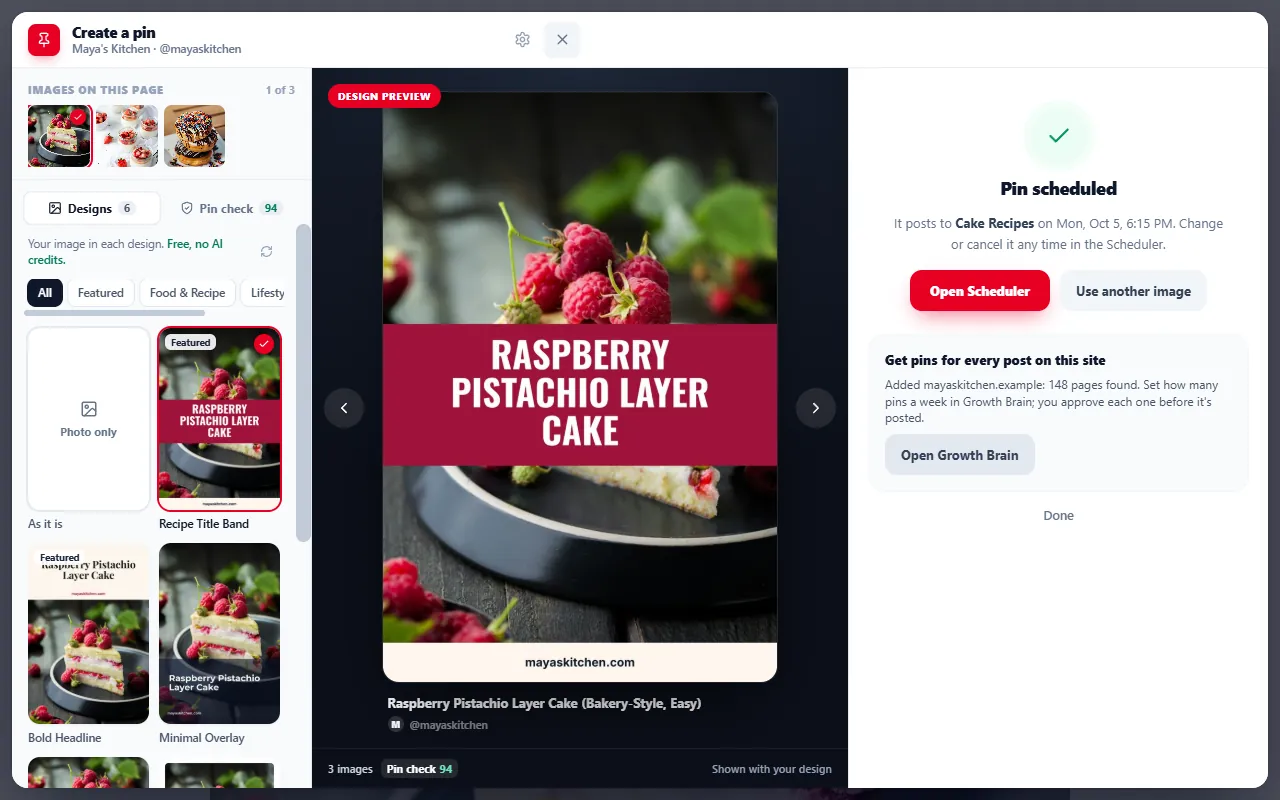
On your own blog, one click adds the site to PinBoostr. Growth Brain reads the sitemap and prepares pins for every post, and each one waits for your approval before it publishes.

  1. PinBoostr preparesGrowth Brain designs pins for your posts, a week at a time.
  2. You approveReview the week in one sitting. Edit or skip any pin.
  3. It publishesApproved pins go out through the official Pinterest API on a paced schedule.

You set how many pins a week Growth Brain prepares, within your plan.

After scheduling, the PinBoostr extension offers to add the whole site: 148 pages found, ready for Growth Brain

Affiliate links that keep your tag

Add your Amazon Associates tag once and it goes on the Amazon product links in your pins, as a clean /dp/ link. Shopify product pages get your tracking or affiliate parameter and the full product gallery to pick from. Etsy listings show their product images.

The right account and board, every time

Choose the Pinterest account and board for each pin. The extension remembers your default account and the last board you used on each one, so the next pin takes one click less.

Three ways to open it

The toolbar icon, a right-click on any image, or Alt+Shift+P. An optional floating button on every page is there too, off until you switch it on.

Compared

Already use Pinterest’s Save button? Keep it.

If all you want is to save to Pinterest from any website, Pinterest’s own Save button does that in one click, and it is free. PinBoostr’s extension is for when the pin is part of a plan: scheduled for later, written for search, and linked the way you earn.

The PinBoostr Chrome extension compared with Pinterest's Save button
  PinBoostr extensionFor pins that are part of a plan Pinterest Save buttonFor saving an idea right now
Made for Publishing pins from your own pages, on a schedule. Saving an idea to one of your boards, right now.
When it goes live When you choose: at a scheduled time, or later from a Pin Lab draft. After you approve it. Straight away.
The image Any image on the page, or a designed pin from your template, with a live preview. The image as it appears on the page.
The link The page, with your Amazon Associates tag or Shopify parameter when you have set one. The page you saved it from.
Accounts Any Pinterest account connected to PinBoostr, with a board picked for each pin. The Pinterest account you are signed in to.
Also AI titles and descriptions, the free Pin check, and whole-blog import. Free, made by Pinterest, nothing to set up.
Add to Chrome — it’s free
Privacy & permissions

Small permissions, on purpose

The extension reads a page only when you ask it to, and it never touches Pinterest itself.

  • Only the page you click onThe extension reads a page when you click its icon, use the right-click menu or press Alt+Shift+P, and only in that tab.
  • Sent only for what you doThe page title, description, URL and the image you picked go to PinBoostr to save a draft, schedule a pin, show a template preview, write with AI or add a site. The Pin check runs in your browser and sends nothing.
  • Never on pinterest.comIt does not run on Pinterest at all. Pins reach Pinterest through the official API, and only after you approve them.
  • The floating button is opt-inIt is off by default. Turning it on asks Chrome for access to the sites you visit; turning it off gives that access back.
  • No ads, no data salesWhat the extension sends is used only to run the features you use. It is never sold or used for advertising.
What it asks Chrome for
activeTab Read the page you opened the extension on, in that tab only.
scripting Open the composer on that page.
storage Remember your connection and settings (affiliate tags, default account) in this browser.
contextMenus Add “Create a pin from this image” and “Create a pin from this page” to the right-click menu.
app.pinboostr.com Talk to your PinBoostr account.
All sitesOptional Only if you turn on the floating button.

Disconnect any time from the extension’s options page. The full details are in our privacy policy. PinBoostr is an independent product, not affiliated with Pinterest, Inc. Chrome is a trademark of Google LLC.

Questions

Before you install

Short answers about cost, permissions, affiliate links and the free Pin check.

Is the PinBoostr Chrome extension free?

Yes. The extension is free to install and works with the PinBoostr free plan: the free plan includes 20 pins a month and 30 AI writes to start. The Pin check works without an account at all. Paid plans raise the limits and add more Pinterest accounts and websites.

Does it publish pins to Pinterest on its own?

No. You pick the image, the words, the board and the time. Scheduled pins publish through the official Pinterest API only after you approve them, and drafts wait in Pin Lab until you finish them. Pins Growth Brain prepares after you add a whole blog wait for your approval too.

Can I create pins from any website?

From almost any blog post or product page you can open in Chrome: click the toolbar icon, right-click an image, or press Alt+Shift+P. Chrome does not let extensions run on a few pages, such as the Chrome Web Store and the browser’s own settings pages, and this extension never runs on Pinterest itself.

How do the Amazon and Shopify affiliate links work?

Enter your Amazon Associates tag, and your Shopify tracking or affiliate parameter, once in the extension’s settings. When you create a pin from an Amazon product page, the link becomes a clean /dp/ product link with your tag; Shopify product links get your parameter. Disclose affiliate links the way Amazon and Pinterest require.

What does the extension have access to?

Only the page you open it on, and only after you click. Besides that page it talks to app.pinboostr.com and nothing else, and it never runs on pinterest.com. The optional floating button is the one feature that needs access to every site, and Chrome asks you first.

What is the Pin check?

A free check of the page you are on: tall images, share image size, title and description length, rich pin data, nopin blocks, the claimed-website tag, alt text and https, each with a plain fix. It runs in your browser, sends nothing to PinBoostr and needs no account.

Can I keep Pinterest’s Save button installed too?

Yes. They are separate extensions with separate jobs: the Save button for saving ideas to your boards, PinBoostr for pins you want to schedule with AI copy, a template or an affiliate link.

Your next pin is already open in another tab

Add the extension, connect your free PinBoostr account, and turn the page you are reading into a pin you approve before it goes out.

  • Free to install
  • Never runs on pinterest.com
  • You approve every pin