One-time deal

1 year of PinBoostr $0.27 $0.14/day $49.99 paid once Save 50%

Ends in --d --h --m --s
Only 1 of 5 left Get the deal
PinBoostr
Roundup by the PinBoostr team · updated October 2026

Best PinClicks Alternatives (2026)

The best PinClicks alternatives in 2026 are PinBoostr (keyword ranges plus pins made and scheduled after you approve them), PinTool (low-cost keyword and profile research), Tailwind's Pinterest SEO plan, Pin Generator (keywords plus AI pins), PinRadar (pin stats in Chrome) and two free Pinterest tools, Trends and Analytics. Pick by the job: research only, or research that turns into pins.

Disclosure: PinBoostr is our product, so we are not a neutral reviewer. Competitor details come from their public sites; check current terms before you buy.

Our 2026 ranking

Pinterest
  1. 1 PinBoostr Best research + pin creation Top pick
  2. 2 PinTool Cheapest paid research
  3. 3 Tailwind Pinterest SEO Best inside a suite
  4. 4 Pin Generator Keywords + AI pins
  5. 5 PinRadar Pin stats in Chrome
  6. 6 Pinterest Trends Best free trend data
  7. 7 Pinterest Analytics Free stats for your own Pins

The quick verdict

Best PinClicks Alternatives at a glance

PinClicks is a Pinterest research tool: Keyword Explorer, Top Pins, Pin Stats, Account Explorer and keyword rank tracking. On October 29, 2026 its pricing page listed Pin Pro at $29 a month or $249 a year (25 tracked keyword rankings) and Pin Plus at $49 a month or $399 a year (5,000 tracked rankings, exports and AI Modified email alerts). People look elsewhere when they want something cheaper or free, or when they want a tool that also makes and publishes the pins, since PinClicks stops at research.

Our pick

PinBoostr

Best research + pin creation

PinTool

Cheapest paid research

Tailwind Pinterest SEO

Best inside a suite

Pin Generator

Keywords + AI pins

PinRadar

Pin stats in Chrome

Pinterest Trends

Best free trend data

Pinterest Analytics

Free stats for your own Pins

Side by side

Best PinClicks Alternatives compared

Pricing is current as of October 2026.

Tool Best for What it covers Starts at Free plan or trial Keyword tracking?
PinBoostr Pick Best research + pin creation Keyword ranges + makes and schedules pins From $19.99/mo No free plan. 1-month free trial, no card No
PinTool Cheapest paid research Keyword ranges, trends, profile research $12/mo No free plan; $1 first month (Discovery) Yes (Starter and up)
Tailwind Pinterest SEO Best inside a suite Keyword research + tracking $14.99/mo ($11.99 yearly) One-time trial: 5 keyword searches Yes
Pin Generator Keywords + AI pins Keyword research, trend alerts, AI pins $29.99/mo ($19.99 yearly) Free preview pins, no card Not listed
PinRadar Pin stats in Chrome Pin engagement stats, CSV export $8/mo, $29/yr or $49 once Free stats overlay No
Pinterest Trends Best free trend data Relative search interest, 2 years Free Free No
Pinterest Analytics Free stats for your own Pins Your own Pin performance Free Free with a business account No

PinClicks alternatives pricing (checked October 29, 2026)

Entry prices in USD, read from each vendor's own pricing page on October 29, 2026. PinClicks is included for comparison.

Tool Billed monthly Billed yearly Free plan or trial Keyword tracking
PinClicks Pin Pro $29/mo $249/yr Free trial (length not stated on its pricing page) 25 keywords
PinBoostr $19.99/mo $199/yr 1-month free trial, no card; 14-day refund No
PinTool $12/mo Not listed $1 first month (Discovery), then $12/mo Yes, from Starter
Tailwind Pinterest SEO $14.99/mo $11.99/mo One-time trial actions per account Yes
Pin Generator $29.99/mo $239.88/yr Free preview pins Not listed
PinRadar $8/mo $29/yr ($49 lifetime) Free stats overlay No
Pinterest Trends Free Free Free No
Pinterest Analytics Free Free Free with a business account No

Prices change and may vary by country or tax. Check each vendor's own pricing page before you buy.

Free PinClicks alternatives

There is no free tool that does everything PinClicks does, but you can cover most of it at no cost. Pinterest Trends shows when a topic rises and falls. Pinterest Analytics shows how your own Pins perform, including outbound clicks. Typing a topic into Pinterest's search bar shows the related searches people use, which is still the quickest free keyword check.

For more ideas, the free PinBoostr keyword tool gives AI keyword suggestions with no sign-up. Those are suggestions, not Pinterest search volumes; the PinBoostr app is where Pinterest's monthly search ranges appear. The free trend finder suggests seasonal angles in the same way.

What PinClicks still does better

To be fair to PinClicks: Pin Plus tracks up to 5,000 keyword rankings and 5,000 search suggestion changes, its Account Explorer lets you study any profile, and it emails you when Pinterest labels your Pins AI Modified. None of the alternatives here matches all three. If rank tracking at that scale is your job, PinClicks may be worth keeping.

If what you need is to act on keywords, the alternatives above go further. See how the PinBoostr Pinterest SEO tool turns keywords into pins you approve, read the Pinterest keyword research guide, or compare every option in the best Pinterest keyword research tools roundup.

Our recommended pick

1. PinBoostr

Best research + pin creation

From $19.99/mo · No free plan. 1-month free trial, no card

PinBoostr's in-app keyword research shows Pinterest's monthly search ranges, then puts the keywords to work: Growth Brain prepares pins from your own posts and product pages with keyword-led titles and descriptions, and you approve each pin before it publishes through the official Pinterest API. Its free public keyword tool gives AI suggestions only, not Pinterest data.

Best for: Bloggers and shop owners who want keyword research to end in published pins, not a spreadsheet.

Pros

  • Research and pin creation in one tool
  • Pinterest monthly search ranges in the app
  • You approve each pin before it posts
  • 14-day refund on any purchase or renewal

Cons

  • No keyword rank tracking
  • No competitor account explorer
  • No AI Modified label alerts
See the PinBoostr Pinterest SEO tool Read the full PinBoostr vs PinBoostr comparison Start with PinBoostr free

2. PinTool

Cheapest paid research

$12/mo · No free plan; $1 first month (Discovery)

PinTool is a Pinterest keyword research tool showing keyword scores, search volume ranges, trend movement, peak months and related searches, plus public profile and competitor research. Starter is $12 a month with 100 research sessions, 30 profile checks, keyword tracking and exports; Pro is $29. Its Discovery plan costs $1 for the first month with tight limits, then renews at $12.

Best for: Researchers who want PinClicks-style data for less.

Pros

  • Lowest paid price in this list
  • Volume ranges, seasonality and profile research
  • Keyword tracking and exports from Starter

Cons

  • Its site says the $12 early-bird price moves to $19 after 100 paying users
  • Refunds only where the law requires
  • Does not make or schedule pins

3. Tailwind Pinterest SEO

Best inside a suite

$14.99/mo ($11.99 yearly) · One-time trial: 5 keyword searches

Since September 2026 Tailwind sells Pinterest SEO as its own plan: keyword research and tracking, keywords by URL, unlimited keyword tags and keyword matching reports, with 50 credits a month. A keyword search costs 1 credit, and the plan is priced per Pinterest account.

Best for: Tailwind users who want keyword research next to their scheduler.

Pros

  • Cheaper than PinClicks Pin Pro
  • Keyword tracking included
  • Pairs with Tailwind scheduling and SmartPin

Cons

  • 50 credits a month, 1 per keyword search
  • Priced per Pinterest account
  • No refunds for unused time, per its help center
Read the full PinBoostr vs Tailwind Pinterest SEO comparison

4. Pin Generator

Keywords + AI pins

$29.99/mo ($19.99 yearly) · Free preview pins, no card

Pin Generator includes keyword research and trend alerts on every current plan, and can add SEO and trend targeting to each post automatically for 2 credits. It also designs and schedules pins and video pins. Pro is $29.99 a month or $239.88 a year for 1,000 credits.

Best for: Product sellers who want keyword targeting built into AI pin batches.

Pros

  • Keywords feed straight into pin creation
  • Video pins and shop imports
  • Unlimited Pinterest profiles

Cons

  • Credit-based
  • No refunds, per its terms
  • Not a dedicated research or rank-tracking tool
Read the full PinBoostr vs Pin Generator comparison

5. PinRadar

Pin stats in Chrome

$8/mo, $29/yr or $49 once · Free stats overlay

PinRadar is a Chrome extension that overlays engagement stats (saves, repins, comments, shares, reactions) on Pins as you browse Pinterest, free and without an account. Pro adds CSV export, keyword research, pinner and board analytics and media downloads.

Best for: People who mainly used PinClicks to see which Pins perform.

Pros

  • Free stats overlay, no account
  • Very low Pro price, including a one-time option
  • CSV export of pin data

Cons

  • Its site says it reads Pinterest data from internal APIs, not the official developer API
  • Chrome only
  • No search volume or rank tracking

6. Pinterest Trends

Best free trend data

Free · Free

Pinterest's own Trends tool shows how interest in a search term rises and falls over up to the last two years, by region. Pinterest normalizes the data, so each chart runs from 0 to 100: it shows relative interest, not raw search counts.

Best for: Anyone planning seasonal content who does not need exact volumes.

Pros

  • Free and first-party
  • Seasonality at a glance
  • Shopping trends with age and gender filters

Cons

  • Relative index, not search volume
  • Some features need a business account
  • No rank tracking or competitor data

7. Pinterest Analytics

Free stats for your own Pins

Free · Free with a business account

Pinterest Analytics, available with a business account, shows impressions, engagements, saves, Pin clicks and outbound clicks with their rates, video metrics and audience size, with custom date ranges over the past year and a half.

Best for: Creators who used PinClicks Pin Stats mostly for their own account.

Pros

  • Free and first-party
  • Outbound clicks and rates per Pin
  • 18 months of history

Cons

  • Only your own account
  • No keyword volumes
  • No rank tracking

See it in action

PinBoostr, behind the scenes

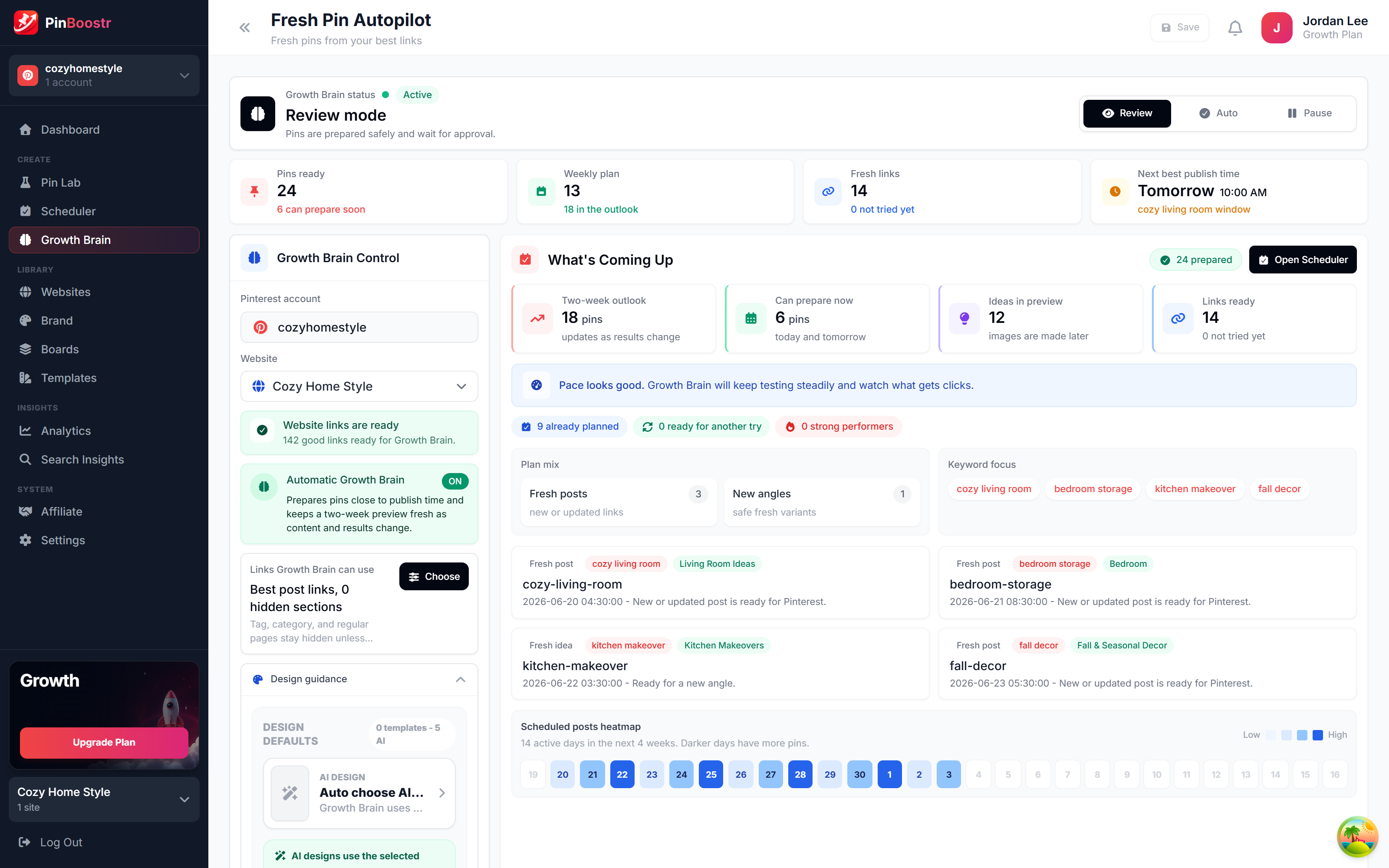
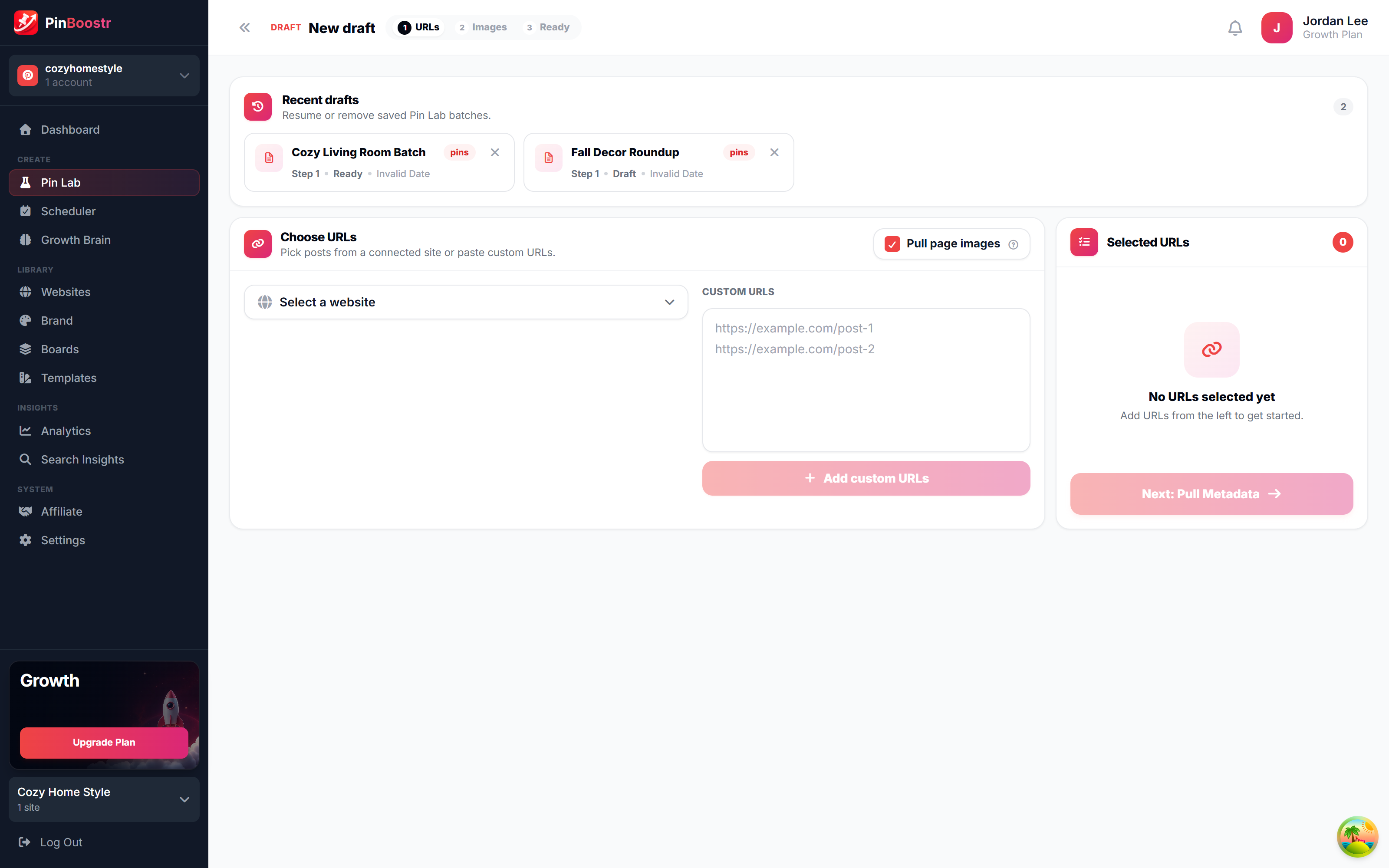
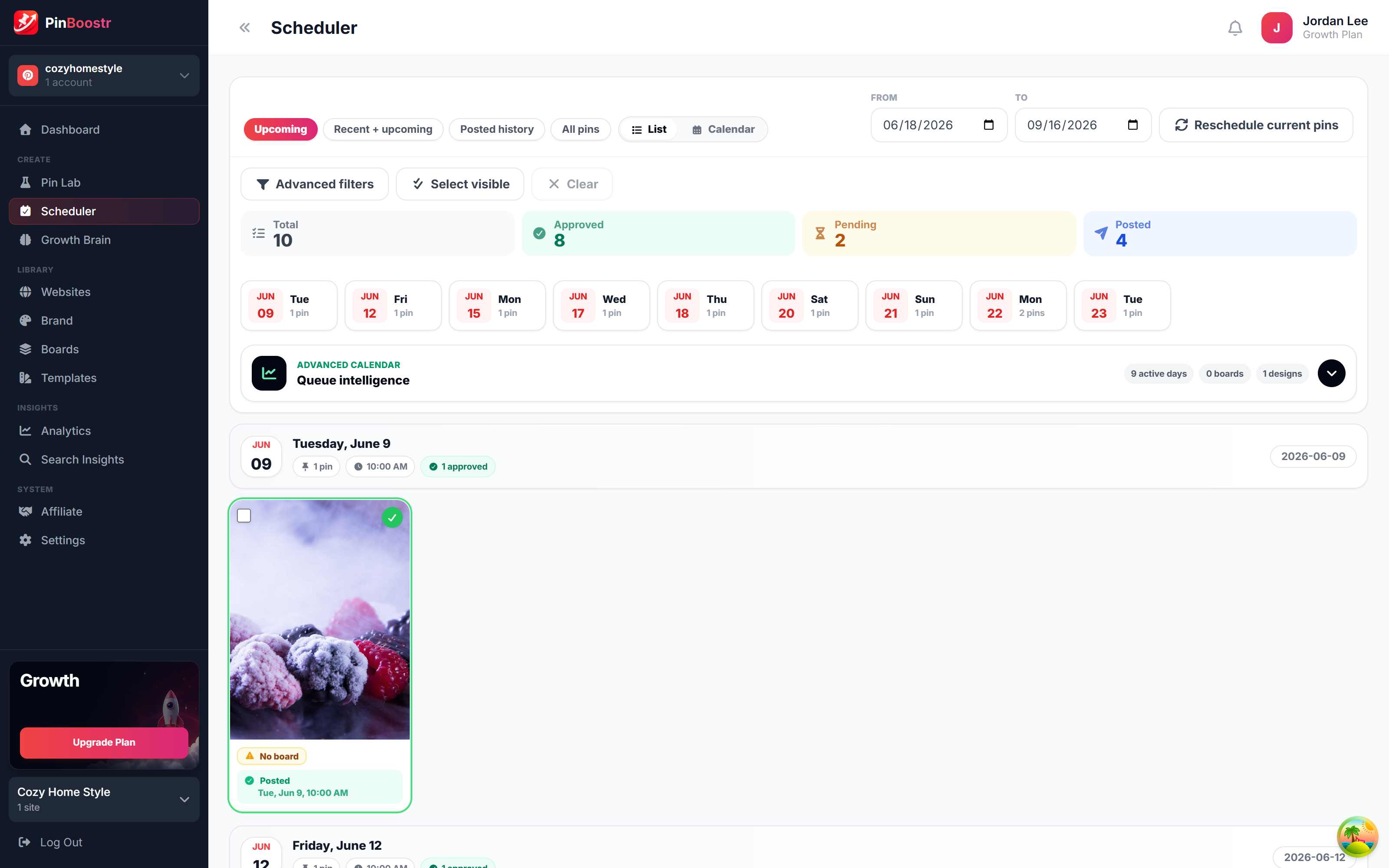
Pinterest reaches 640 million monthly users (Pinterest, Q2 2026). Here is how PinBoostr helps you reach them — it prepares the pins, you approve them, and they publish on a steady schedule.

PinBoostr Growth Brain suggesting your best content for new pins
Growth Brain suggests your best content
PinBoostr Pin Lab editor creating a branded Pinterest pin
Pin Lab generates branded pins
PinBoostr scheduler queue publishing approved pins through the official Pinterest API
The scheduler publishes approved pins

Best PinClicks Alternatives FAQ

What is the best PinClicks alternative?

For most bloggers, PinBoostr: its keyword research shows Pinterest's monthly search ranges and it turns the keywords into pins you approve, from $19.99 a month. PinTool is the cheapest dedicated research tool at $12 a month, and Tailwind's Pinterest SEO plan suits people already on Tailwind.

Is there a free PinClicks alternative?

Yes, partly. Pinterest Trends (relative search interest over two years) and Pinterest Analytics (your own Pin stats) are free, and PinRadar's Chrome overlay shows engagement stats on Pins for free. None gives exact search volumes or rank tracking.

How much does PinClicks cost?

On October 29, 2026 PinClicks listed Pin Pro at $29 a month or $249 a year and Pin Plus at $49 a month or $399 a year. Pin Plus adds 5,000 tracked keyword rankings, exports and AI Modified email alerts.

Which PinClicks alternative tracks keyword rankings?

PinTool includes keyword tracking from its $12 Starter plan, and Tailwind's Pinterest SEO plan includes keyword research and tracking. PinBoostr, Pin Generator and Pinterest's free tools do not track rankings.

Does Pinterest show keyword search volume for free?

Pinterest Trends is free but shows relative interest on a 0 to 100 scale, not raw search counts. Tools such as PinClicks, PinTool and the PinBoostr app show volume figures or ranges.

Can I use PinClicks with PinBoostr?

Yes. Use PinClicks to research and track rankings, and PinBoostr to turn those keywords into pins from your own posts, which publish only after you approve them.

Skip the comparison shopping

PinBoostr creates your pins and optimizes the keywords, then publishes the ones you approve to Pinterest — try it free and see the difference.

Try PinBoostr free

No credit card required.