One-time deal

1 year of PinBoostr $0.27 $0.14/day $49.99 paid once Save 50%

Ends in --d --h --m --s
Only 1 of 5 left Get the deal
PinBoostr
Roundup by the PinBoostr team · updated October 2026

Best Free Pinterest Schedulers (2026)

The best free Pinterest scheduler is Pinterest's own: a business account can schedule up to 10 Pins up to 30 days ahead, bulk-upload up to 200 Pins from a CSV file and auto-publish from an RSS feed. For more, Metricool, Buffer and Publer have real free plans that include Pinterest. Most other "free" schedulers are 14-day or one-time trials.

Disclosure: PinBoostr is our product, so we are not a neutral reviewer. Competitor details come from their public sites; check current terms before you buy.

Our 2026 ranking

Pinterest
  1. 1 Pinterest's own scheduler Best free scheduler overall
  2. 2 Pinterest bulk upload + RSS Best free bulk option
  3. 3 Metricool Best free plan with analytics
  4. 4 Buffer Simplest free plan
  5. 5 Publer Best free multi-account queue
  6. 6 PinBoostr Free trial, not a free plan

The quick verdict

Best Free Pinterest Schedulers at a glance

We only list tools with a free plan that lasts and covers Pinterest, checked on each vendor's own site on October 29, 2026. PinBoostr is listed last and honestly: it is a 1-month free trial, not a free plan. Free schedulers publish pins you already made, so you still design each pin yourself.

Pinterest's own scheduler

Best free scheduler overall

Pinterest bulk upload + RSS

Best free bulk option

Metricool

Best free plan with analytics

Buffer

Simplest free plan

Publer

Best free multi-account queue

PinBoostr

Free trial, not a free plan

Side by side

Best Free Pinterest Schedulers compared

Pricing is current as of October 2026.

Tool Best for Free limit Starts at Free plan? Paid plans from
Pinterest's own scheduler Best free scheduler overall 10 Pins scheduled, 30 days ahead Free Yes, built in Always free
Pinterest bulk upload + RSS Best free bulk option 200 Pins per CSV; RSS up to 200 Pins/day Free Yes, built in Always free
Metricool Best free plan with analytics 20 scheduled posts a month Free Yes: 1 brand, 20 posts/mo $25/mo ($20 yearly)
Buffer Simplest free plan 10 scheduled posts per channel Free Yes: 3 channels, 10 posts each $5/channel/mo
Publer Best free multi-account queue 10 scheduled posts per account Free Yes: 3 accounts, 10 posts each See vendor site
PinBoostr Free trial, not a free plan Makes the pins, then schedules them From $19.99/mo No. 1-month free trial, no card $19.99/mo ($199/yr)

Free Pinterest scheduler limits compared (checked October 29, 2026)

What each free option lets you do with Pinterest, read from the vendor's own site on October 29, 2026.

Tool Free limit Accounts on free Time limit Paid from
Pinterest's own scheduler 10 Pins scheduled, up to 30 days ahead Your business account None Always free
Pinterest bulk upload Up to 200 images or videos per upload Your business account None Always free
Pinterest RSS auto-publish Up to 200 Pins a day Claimed website needed None Always free
Metricool Free 20 posts a month 1 brand None $25/mo ($20 yearly)
Buffer Free 10 scheduled posts per channel 3 channels None $5/channel/mo
Publer Free 10 scheduled posts per account 3 accounts None See vendor site
PinBoostr Free for the first month, no card 1 Pinterest account + 1 website 1-month trial $19.99/mo

Free plans change often. Check the vendor's own pricing page before you rely on a limit.

Pinterest schedulers that are trials, not free plans

Many tools that rank for "free Pinterest scheduler" are free only for a while. Here is what we found on each vendor's own site on October 29, 2026:

  • Tailwind: you can start without a card, but the free part is a one-time set of 10 scheduled Pins, 5 SmartPins, 5 Ghostwriter generations, 5 keyword searches and 3 Turbo boosts per Pinterest account. It does not reset. See our Tailwind app review.
  • Later: a 14-day free trial; Starter is $18.75 a month billed yearly.
  • RecurPost: a 14-day free trial; its pricing page says there is no permanent free plan.
  • Vista Social: a 14-day free trial, no free plan listed.
  • Zoho Social: has a free plan, but Pinterest starts on its paid Standard plan.
  • Planoly: a free plan on its mobile app with 10 uploads a month; its pricing page does not say whether Pinterest is included.
  • PinBoostr: a 1-month free trial with no card, then from $19.99 a month.

Which free Pinterest scheduler should you use?

If you post a few pins a week, Pinterest's own scheduler is enough, and it is the one with no third-party access to your account. Our guide to scheduling Pinterest pins walks through it.

If you publish new blog posts often, claim your website and turn on RSS auto-publish; the free website claim checker confirms your site is claimed. Claiming also unlocks Publer's free plan for a new Pinterest account.

If you also post to other social networks, Metricool, Buffer or Publer keep everything in one calendar for free. If your real problem is making enough pins, no free scheduler solves it; that is when a paid tool such as the PinBoostr Pinterest scheduler, which prepares pins for you to approve, is worth testing. For paid options too, see the best Pinterest scheduling tools.

1. Pinterest's own scheduler

Best free scheduler overall

Free · Yes, built in

With a Pinterest business account you can schedule a Pin up to 30 days in advance and have up to 10 Pins scheduled at a time, on the web or in the app. You schedule one Pin at a time, and after scheduling you can change the date, title, board, description and link, but not the image or video.

Best for: Anyone posting a few pins a week who wants nothing extra to connect.

Pros

  • Free and first-party
  • No third-party access to your account
  • Works on web and mobile

Cons

  • Only 10 Pins scheduled at once
  • One Pin at a time
  • Cannot change the image after scheduling
2. Pinterest bulk upload + RSS

Best free bulk option

Free · Yes, built in

Pinterest's bulk creation tool takes up to 200 images or videos from a CSV file, and a future date in the publish date column schedules each Pin. Its RSS auto-publish turns new items in your feed into Pins within 24 hours, up to 200 Pins a day, each feed going to the board you choose. RSS needs a claimed website.

Best for: Bloggers with ready pin images or a steady stream of new posts.

Pros

  • Schedule many Pins at once for free
  • New posts reach Pinterest automatically
  • A different board per feed

Cons

  • You prepare the CSV and images yourself
  • RSS Pins use the image in your feed
  • RSS needs a claimed website

3. Metricool

Best free plan with analytics

Free · Yes: 1 brand, 20 posts/mo

Metricool's free plan manages 1 brand with one profile per network, LinkedIn and X excluded, and schedules up to 20 posts a month with 30 days of analytics and 5 competitor profiles. Starter is $25 a month, or $20 billed yearly.

Best for: Creators who want Pinterest plus other networks and some analytics, free.

Pros

  • Analytics on the free plan
  • Pinterest and other networks in one calendar
  • No time limit

Cons

  • 20 posts a month across all networks
  • Only 30 days of analytics
  • Pinterest features lighter than Pinterest-only tools
Read the full PinBoostr vs Metricool comparison

4. Buffer

Simplest free plan

Free · Yes: 3 channels, 10 posts each

Buffer's free plan connects up to 3 channels, Pinterest business or personal accounts included, with 10 scheduled posts per channel that refill as posts go out, for 1 user. Essentials is $5 per channel a month.

Best for: People who want the easiest free scheduler for Pinterest and two other channels.

Pros

  • Very easy to learn
  • Queue refills as posts publish
  • Cheap per-channel upgrade

Cons

  • 10 queued posts per channel
  • 30-day insights on the free plan
  • No Pinterest keyword help
Read the full PinBoostr vs Buffer comparison

5. Publer

Best free multi-account queue

Free · Yes: 3 accounts, 10 posts each

Publer Free has no expiry date. It connects 3 social accounts (X excluded), holds up to 10 scheduled posts per account at once (30 in total) and 25 drafts, and deletes published posts from its history after 24 hours. On the free plan, a Pinterest account needs at least 100 followers or a claimed website.

Best for: Pinners with an established or claimed account who post across a few networks.

Pros

  • No expiry
  • 30 scheduled posts across 3 accounts
  • Drafts on the free plan

Cons

  • Pinterest needs 100 followers or a claimed site
  • Only 24 hours of post history
  • X needs a paid plan

6. PinBoostr

Free trial, not a free plan

From $19.99/mo · No. 1-month free trial, no card

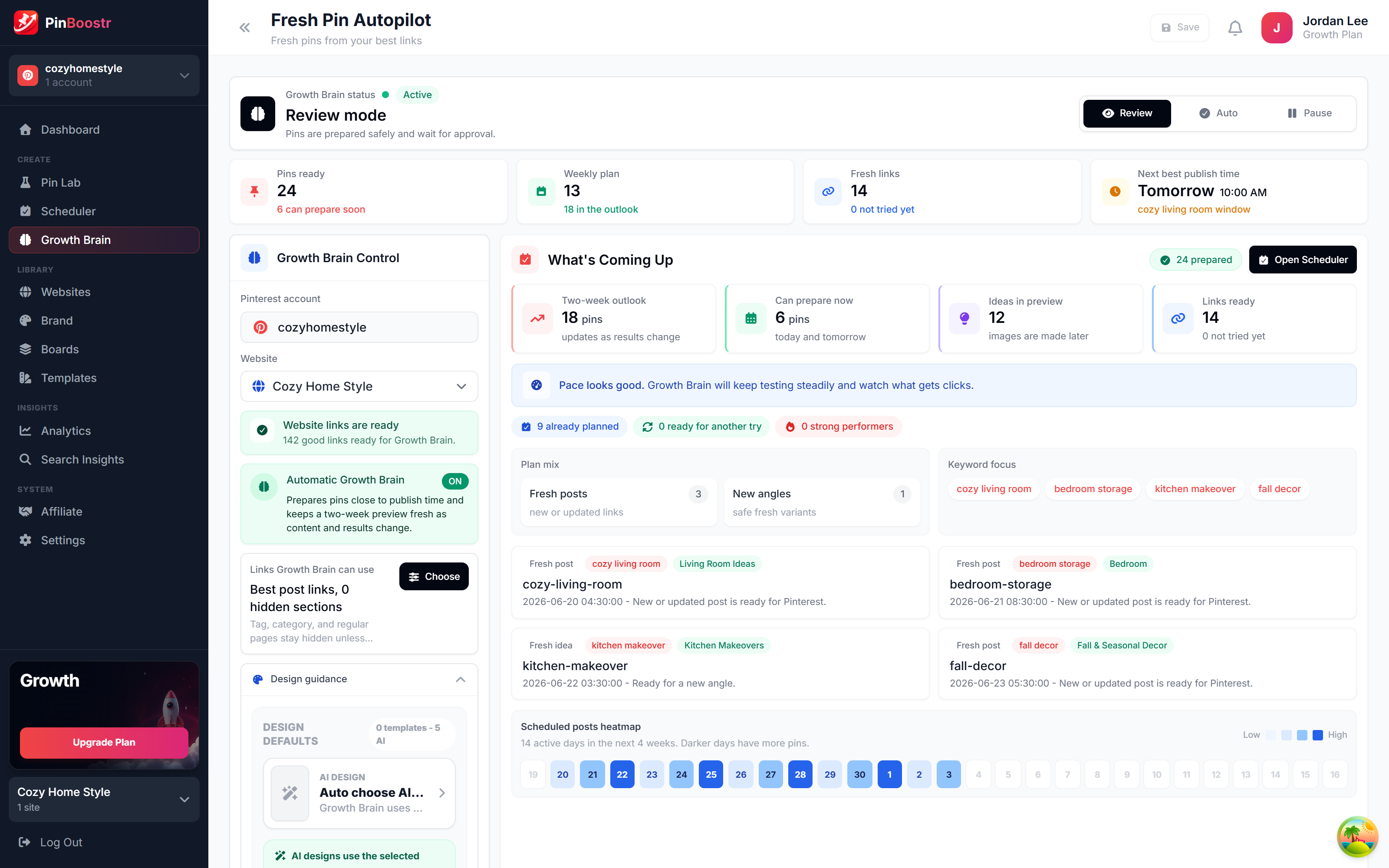
PinBoostr is not free after the trial, so it is here for a different reason: it makes the pins. Growth Brain prepares pins from your own posts and product pages, AI writes keyword-led titles and descriptions, and you approve each pin before it publishes through the official Pinterest API, spaced across the week. Starter is $19.99 a month for 1 Pinterest account and 1 website, up to 20 pins a day.

Best for: Bloggers whose real bottleneck is making pins, not scheduling them.

Pros

  • Creates the pins, not just schedules them
  • You approve each pin before it posts
  • 1-month free trial with no card
  • 14-day refund on any purchase or renewal

Cons

  • No free plan after the trial
  • No Instagram or Facebook scheduling
See the PinBoostr Pinterest scheduler

See it in action

PinBoostr, behind the scenes

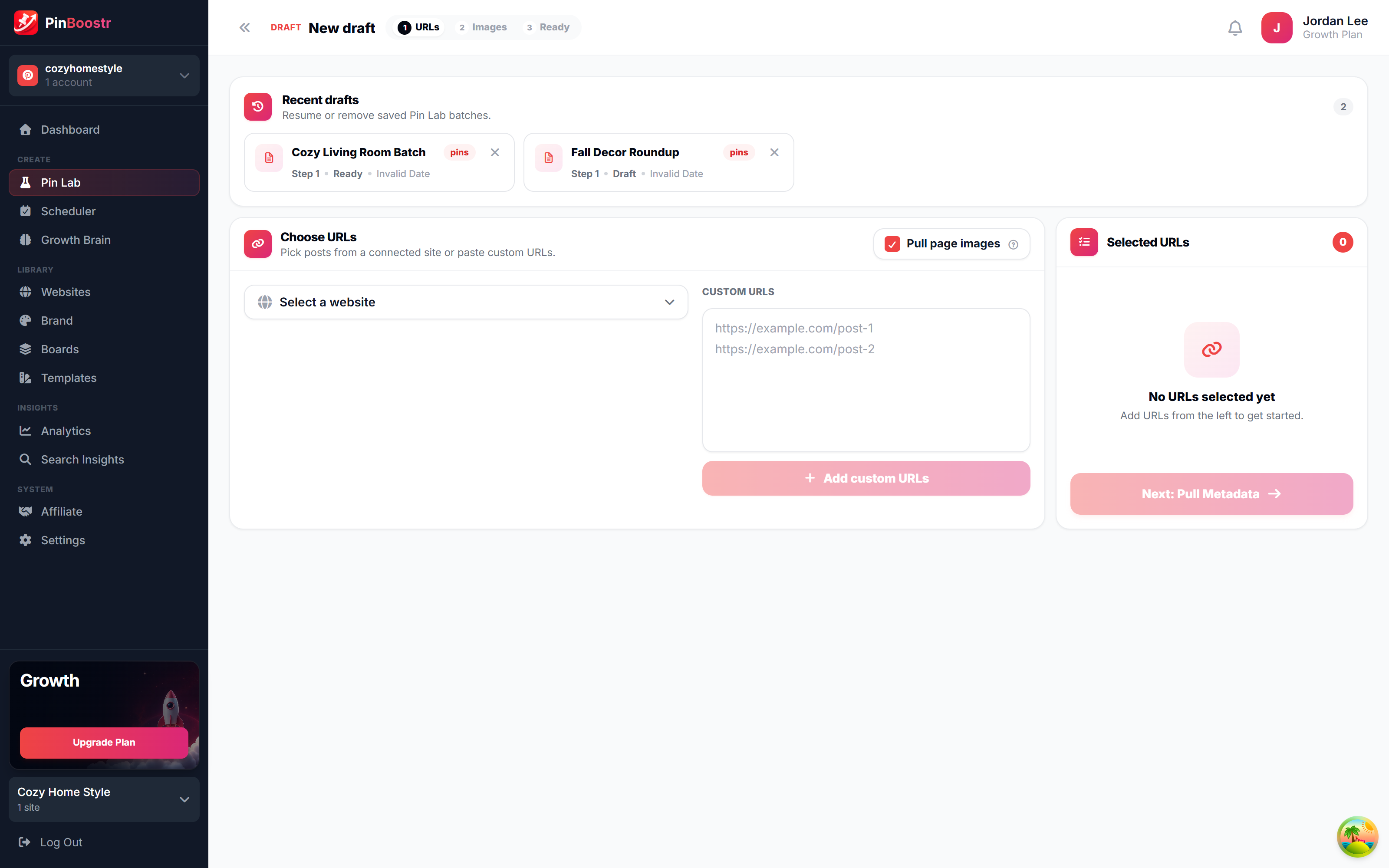
Pinterest reaches 640 million monthly users (Pinterest, Q2 2026). Here is how PinBoostr helps you reach them — it prepares the pins, you approve them, and they publish on a steady schedule.

PinBoostr Growth Brain suggesting your best content for new pins
Growth Brain suggests your best content
PinBoostr Pin Lab editor creating a branded Pinterest pin
Pin Lab generates branded pins
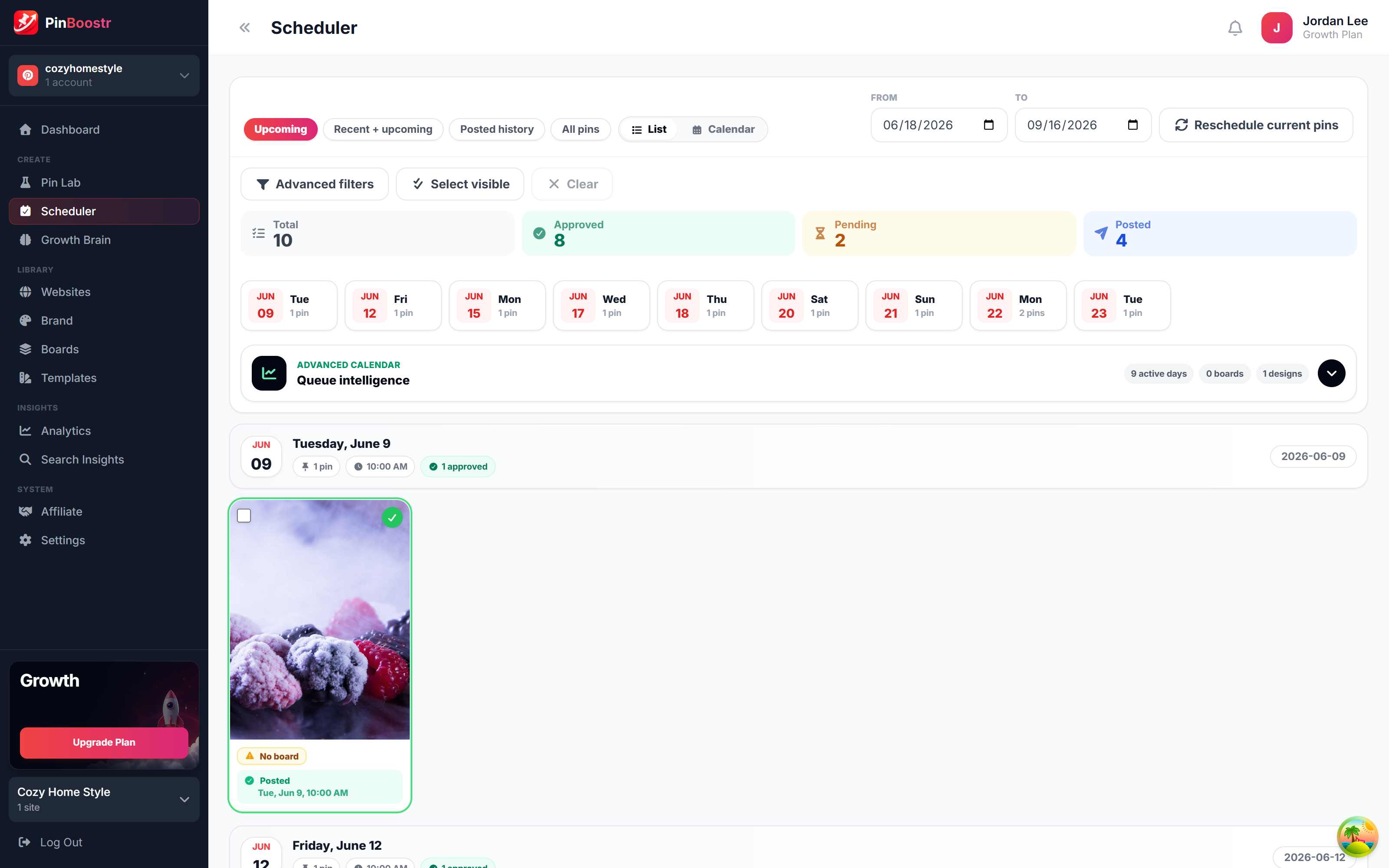
PinBoostr scheduler queue publishing approved pins through the official Pinterest API
The scheduler publishes approved pins

Best Free Pinterest Schedulers FAQ

What is the best free Pinterest scheduler?

Pinterest's own scheduler: free with a business account, up to 10 Pins scheduled up to 30 days ahead, plus free bulk upload and RSS auto-publish. For more posts or other networks, Metricool (20 posts a month), Buffer (3 channels, 10 posts each) and Publer (3 accounts, 10 posts each) have real free plans.

Can you schedule Pinterest pins for free?

Yes. Any Pinterest business account can schedule Pins for free on the web or in the app, up to 30 days ahead, with up to 10 Pins scheduled at a time.

How many pins can you schedule on Pinterest for free?

Up to 10 at a time with Pinterest's scheduler. The bulk creation tool can schedule up to 200 images or videos from one CSV upload using a future publish date, and RSS auto-publish creates up to 200 Pins a day from your feed.

Is Tailwind free?

Not as an ongoing plan. Tailwind gives each Pinterest account a one-time set of trial actions, including 10 scheduled Pins, that does not reset. Paid plans start at $29.99 a month, or $17.99 billed yearly.

Is RecurPost free?

No. RecurPost offers a 14-day free trial, and its pricing page says there is no permanent free plan.

Does PinBoostr have a free plan?

No. PinBoostr has a 1-month free trial with no card, then plans from $19.99 a month with a 14-day refund. Unlike free schedulers, it prepares the pins for you to approve.

Skip the comparison shopping

PinBoostr creates your pins and optimizes the keywords, then publishes the ones you approve to Pinterest — try it free and see the difference.

Try PinBoostr free

No credit card required.