
Create pins with PinBoostr
One click sends the product and your affiliate link to the PinBoostr extension, which opens its pin composer right on the page. Every pin waits for your approval before it publishes.
PinBoostr Earn is a free affiliate link generator and commission finder for Chrome. Open a product on Amazon, AliExpress, Walmart, Target, eBay or Etsy and a small card shows what you would earn per sale, with your own affiliate link ready to copy.
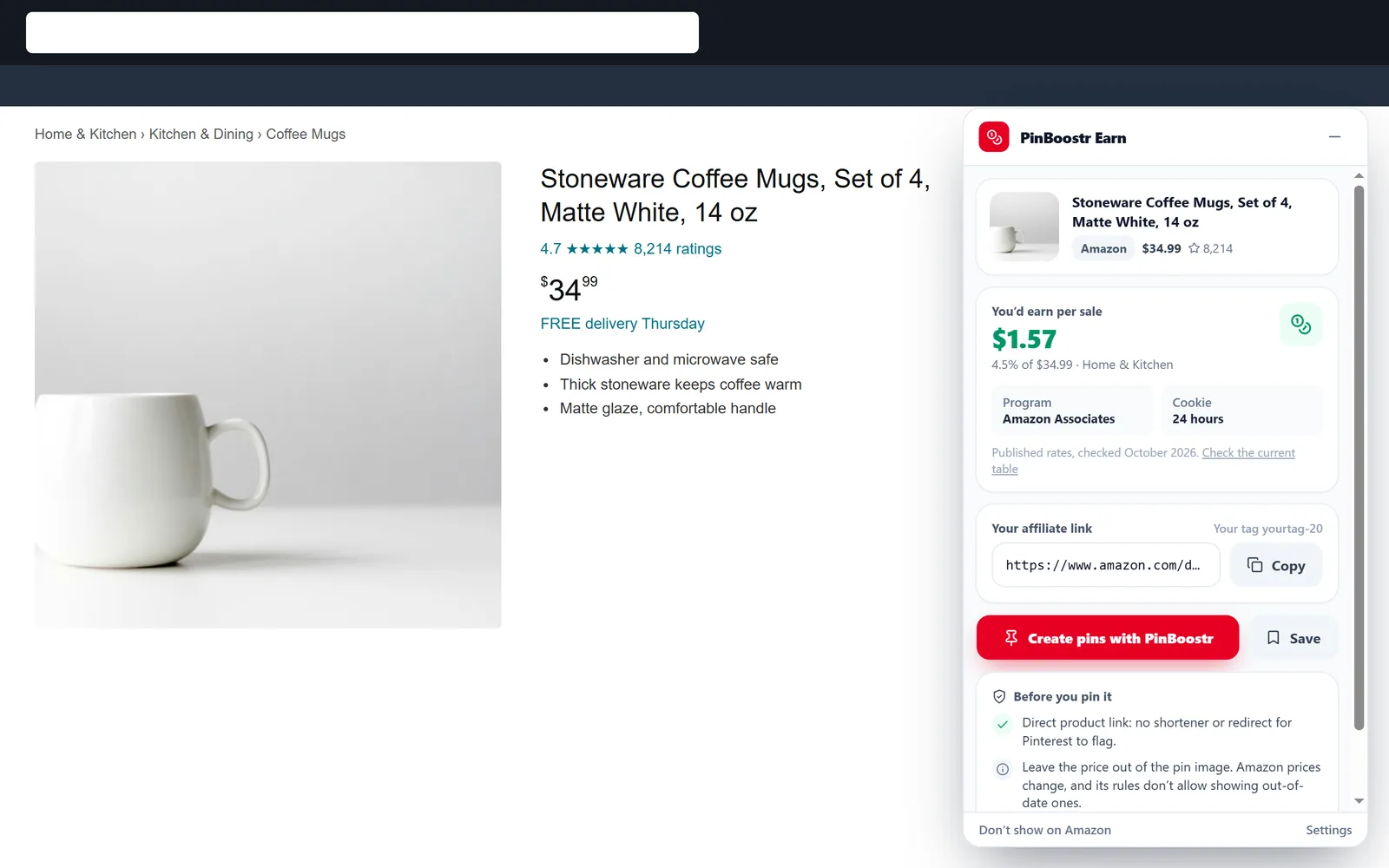
No link builder tabs, no spreadsheets of commission rates. The answer is on the product you are already looking at.
Your Amazon tag, your eBay campaign ID, or one link from your network’s link builder for Walmart, Target or Etsy. Each program, the way it works.
A small card in the corner shows what the product pays per sale. Click it for the program, the cookie length and notes before you share it.
Copy your link, save the product to a list you can export as CSV, or send it to PinBoostr to design and schedule pins with your link in them.
For bloggers, Pinterest creators and anyone who shares products they like.
The program’s published rate for the product’s category, times its price. When a store shows you a converted price, the card says so and treats the amount as an estimate.
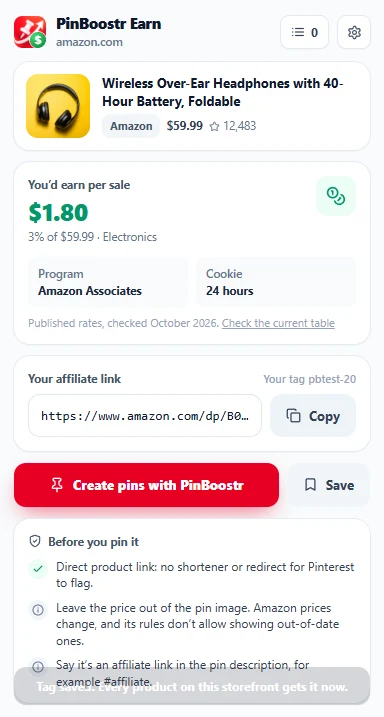
Amazon takes your tag; eBay your campaign ID, with the right link for every eBay country site. For Walmart, Target and Etsy, paste one link from your network’s link builder and every product gets its own. Where a program gives one link per product, as AliExpress does, the card keeps the link you make for that product, and picks it up by itself when you click Get link in the Portals bar.
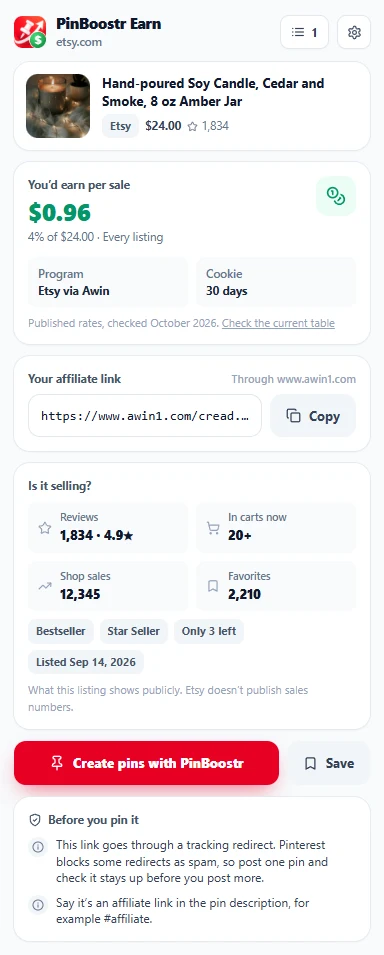
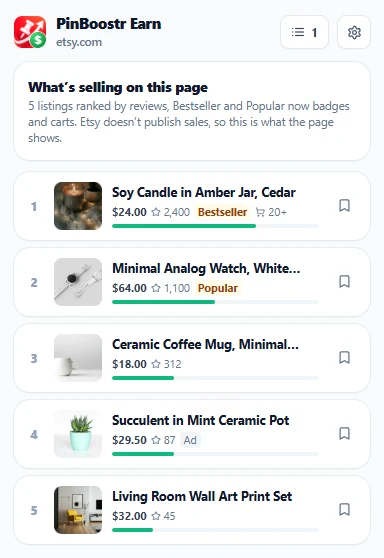
On marketplace search results, click the icon and the listings are ranked by the signals the page itself shows: reviews, Bestseller and Popular now badges, and how many people have it in their cart. No made-up sales numbers.
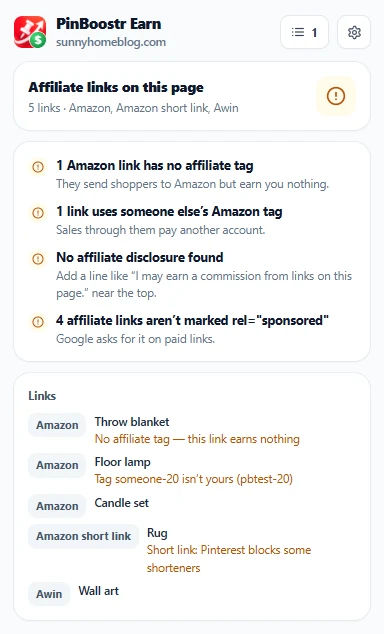
Open one of your own posts and click the icon. It lists every affiliate link on the page and flags the ones that need fixing.
One click sends the product and your affiliate link to the PinBoostr extension, which opens its pin composer right on the page. Every pin waits for your approval before it publishes.
Save products as you browse, with their price, rate and your link, and export the list to CSV for your next roundup post.
21 Amazon storefronts and 14 eBay sites. Amazon.com gets its exact category rates; other Amazon storefronts publish their own, so the card shows the range and links the table.
The published rates PinBoostr Earn uses, checked October 2026. Programs change them from time to time, so confirm on the program’s own page before you rely on a number.
| Store | Program | Commission | Cookie |
|---|---|---|---|
| Amazon | Amazon Associates | 0–20% by category | 24 hours (longer if they add it to their cart) |
| AliExpress | AliExpress Portals | 3–9%, set per product | Shown in Portals |
| Walmart | Walmart via Impact | 1–4% | 3 days |
| Target | Target Partners via Impact | 0–8% by department | 7 days |
| eBay | eBay Partner Network | 1–4% by category | 24 hours |
| Etsy | Etsy via Awin | 4% on every listing | 30 days (7 in the Etsy app) |
Amazon pays by category, so two products at the same price can pay very differently. This is the US fee schedule the card applies on amazon.com.
Source: Amazon Associates fee schedule, checked October 2026.
PinBoostr Earn has no server. It works out every number on the page you are looking at.
storage | Keep your affiliate tags and links, card preferences and saved products in this browser. |
|---|---|
activeTab | Read the page you clicked the icon on, in that tab only. |
scripting | Run the one-time page reader in that tab after your click. |
The six stores | Show the card on their product pages and read the product’s title, price, category and image. |
Full details in our privacy policy. PinBoostr Earn is an independent tool, not made or endorsed by any store or affiliate program. Store and program names are trademarks of their owners. Chrome is a trademark of Google LLC.
Short answers about cost, rates, your tags and how it works with PinBoostr.
Yes. PinBoostr Earn is free to install and free to use, with no account. You only need a PinBoostr account if you want to send products to PinBoostr to design and schedule pins.
It reads the product’s category and price from the page and applies the affiliate program’s published rate for that category. When it can’t place the category, it shows the program’s range instead of a guess. Rates were checked in October 2026 and change from time to time, so every card links to the program’s own rate table: confirm there before you rely on a number.
Only yours. You add your own Amazon tag, eBay campaign ID or a link from your network once in Settings, and every link the extension builds carries it. PinBoostr never adds a tag of its own.
Yes. The card still shows what a product pays on every supported store, so you can compare programs before you join one. Where a program gives you one link per product, as AliExpress Portals does, paste that link on the product’s card, or click Get link in the Portals SiteStripe bar and the card picks it up by itself.
Stores show visitors abroad prices converted into their own currency. You are paid on the store’s own price, so the card shows the amount in the currency on your screen and says when it was converted.
Open one of your own blog posts and click the icon. It lists the affiliate links on the page and flags links with no tag, links with someone else’s tag, links missing rel="sponsored" and a missing affiliate disclosure.
PinBoostr Earn is for choosing products and getting your link. The PinBoostr extension designs and schedules pins. They work together: Create pins with PinBoostr hands the product and your link to the PinBoostr extension.
Add PinBoostr Earn, put in your own tags, and the next product you open shows what it pays.