One-time deal

1 year of PinBoostr $99.99 $49.99 paid once Save 50%

Ends in --d --h --m --s
Only 3 of 5 left Get the deal
PinBoostr
Roundup by the PinBoostr team · updated October 2026

Best Taplio Alternatives (2026)

The best Taplio alternatives in 2026 are PinBoostr (official API only, carousel studio, Pinterest in the same account), AuthoredUp (post previews and analytics), Supergrow (AI writing and carousels), Buffer (cheap multi-network scheduling), Typefully (clean writing and X cross-posting) and LinkedIn's own free scheduler. Most people leave Taplio because they pay $39 to $199 a month mainly to schedule posts.

Disclosure: PinBoostr is our product, so we are not a neutral reviewer. Competitor details come from their public sites; check current terms before you buy.

Our 2026 ranking

LinkedIn
  1. 1 PinBoostr Best for API-only scheduling + carousels Top pick
  2. 2 AuthoredUp Best previews + analytics
  3. 3 Supergrow Best AI writing alternative
  4. 4 Buffer Cheapest paid scheduler
  5. 5 Typefully Best writing experience
  6. 6 LinkedIn's own scheduler Best free option

The quick verdict

Best Taplio Alternatives at a glance

Taplio is a strong product: a large database of high-performing posts to learn from, an AI writer, a carousel maker, analytics, and on its Pro plan a lead database and outreach. It costs $39 a month for Starter (250 AI credits), $69 for Growth and $199 for Pro, or $32, $49 and $149 a month paid yearly, with a 7-day trial and a 30-day money-back guarantee. Its engagement features come through a free Chrome extension. People look elsewhere when they mainly need writing and scheduling, want nothing running in their browser session, or find the price high for what they use. Prices below were read from each vendor's site on October 14, 2026.

Our pick

PinBoostr

Best for API-only scheduling + carousels

AuthoredUp

Best previews + analytics

Supergrow

Best AI writing alternative

Buffer

Cheapest paid scheduler

Typefully

Best writing experience

LinkedIn's own scheduler

Best free option

Side by side

Best Taplio Alternatives compared

Pricing is current as of October 2026.

Tool Best for Strength Starts at Free
PinBoostr Pick Best for API-only scheduling + carousels Official API only From $19.99/mo 14-day free trial
AuthoredUp Best previews + analytics Previews + analytics $19.95/mo Free trial
Supergrow Best AI writing alternative AI writing + carousels $39/mo 7-day trial
Buffer Cheapest paid scheduler Multi-network scheduling $5/channel/mo Free plan (3 channels)
Typefully Best writing experience Writing + X cross-posting Paid plans Free plan
LinkedIn's own scheduler Best free option Built into LinkedIn Free Free
Our recommended pick

1. PinBoostr

Best for API-only scheduling + carousels

From $19.99/mo · 14-day free trial

PinBoostr covers the part of Taplio most people use daily: writing, carousels and scheduling, all through LinkedIn's official API with one posting permission and no browser extension. Draft by hand or with AI in your own voice, design carousels in a built-in studio, and drop posts into weekly posting times. Nothing posts until you approve it, and the same account runs a full Pinterest engine.

Best for: Creators and founders who want writing, carousels and scheduling without paying for a lead database or running an extension.

Pros

  • About half the price of Taplio Starter, with Pinterest included
  • Official API only, nothing acting in your browser
  • Carousel studio with PDF export
  • 14-day free trial and a 14-day refund

Cons

  • No viral-post inspiration database
  • No lead database or outreach, by design
  • Personal profiles only, not company pages
  • AI drafts use credits
Read the full PinBoostr vs PinBoostr comparison Start with PinBoostr free

2. AuthoredUp

Best previews + analytics

$19.95/mo · Free trial

AuthoredUp is a writing and analytics layer over LinkedIn: accurate previews of how a post looks on each device, a library of hooks and snippets, formatting tools and some of the clearest post analytics available. It works as a browser extension.

Best for: Writers who care most about how a post looks and what it did afterwards.

Pros

  • Best-in-class post previews
  • Clear, useful analytics
  • Lower price than Taplio

Cons

  • Works through a browser extension
  • No carousel designer
  • LinkedIn only

3. Supergrow

Best AI writing alternative

$39/mo · 7-day trial

Supergrow is a LinkedIn content tool built around AI writing, with a carousel maker and a scheduling calendar. Its Pro plan covers one LinkedIn account; Teams is $199 a month for five.

Best for: People who want AI to do more of the writing than Taplio Starter allows.

Pros

  • AI writing at the center of the product
  • Carousel maker and calendar included
  • 7-day free trial

Cons

  • Same price as Taplio Starter
  • LinkedIn only
  • No lead tools

4. Buffer

Cheapest paid scheduler

$5/channel/mo · Free plan (3 channels)

Buffer is a plain, cheap scheduler for every major network, LinkedIn included. Its free plan connects up to 3 channels with 10 scheduled posts each, and paid plans are priced per channel.

Best for: Anyone who wants simple scheduling across several networks and no LinkedIn-specific extras.

Pros

  • Usable free plan
  • Official APIs on every network
  • Lowest paid price per channel

Cons

  • No LinkedIn-specific writing help
  • No carousel designer
  • Shallow analytics
Read the full PinBoostr vs Buffer comparison

5. Typefully

Best writing experience

Paid plans · Free plan

Typefully is a calm, distraction-free editor that started on X and added LinkedIn: drafting, scheduling and simple analytics with none of the growth-hacking layer.

Best for: Writers who post to both X and LinkedIn and want one quiet place to draft.

Pros

  • Excellent writing interface
  • Cross-posts to X cleanly
  • Free plan for light use

Cons

  • No carousel designer
  • Light LinkedIn analytics
  • Few LinkedIn-specific features

6. LinkedIn's own scheduler

Best free option

Free · Free

LinkedIn's composer can schedule a post from 10 minutes to 3 months ahead: click the clock icon, pick a time, and it publishes from your profile.

Best for: Anyone posting once or twice a week who writes each post close to the day.

Pros

  • Free, with nothing to connect
  • Works on desktop and mobile
  • Up to 3 months ahead

Cons

  • One post at a time, no weekly posting slots
  • No writing or design help
  • Cannot schedule events or jobs

See it in action

PinBoostr, behind the scenes

Pinterest reaches 640 million monthly users (Pinterest, Q2 2026). Here is how PinBoostr helps you reach them — it prepares the pins, you approve them, and they publish on a steady schedule.

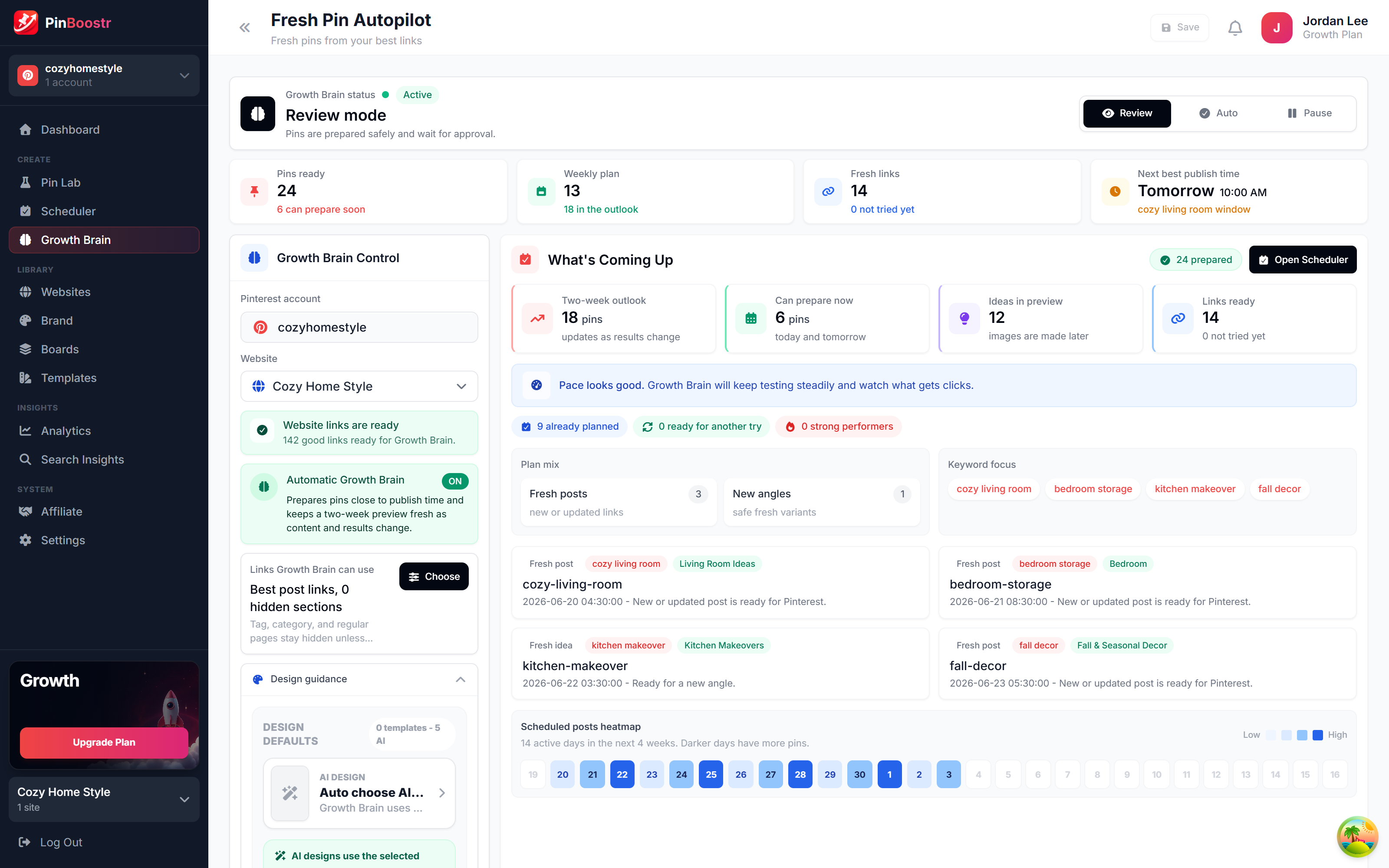
PinBoostr Growth Brain suggesting your best content for new pins
Growth Brain suggests your best content
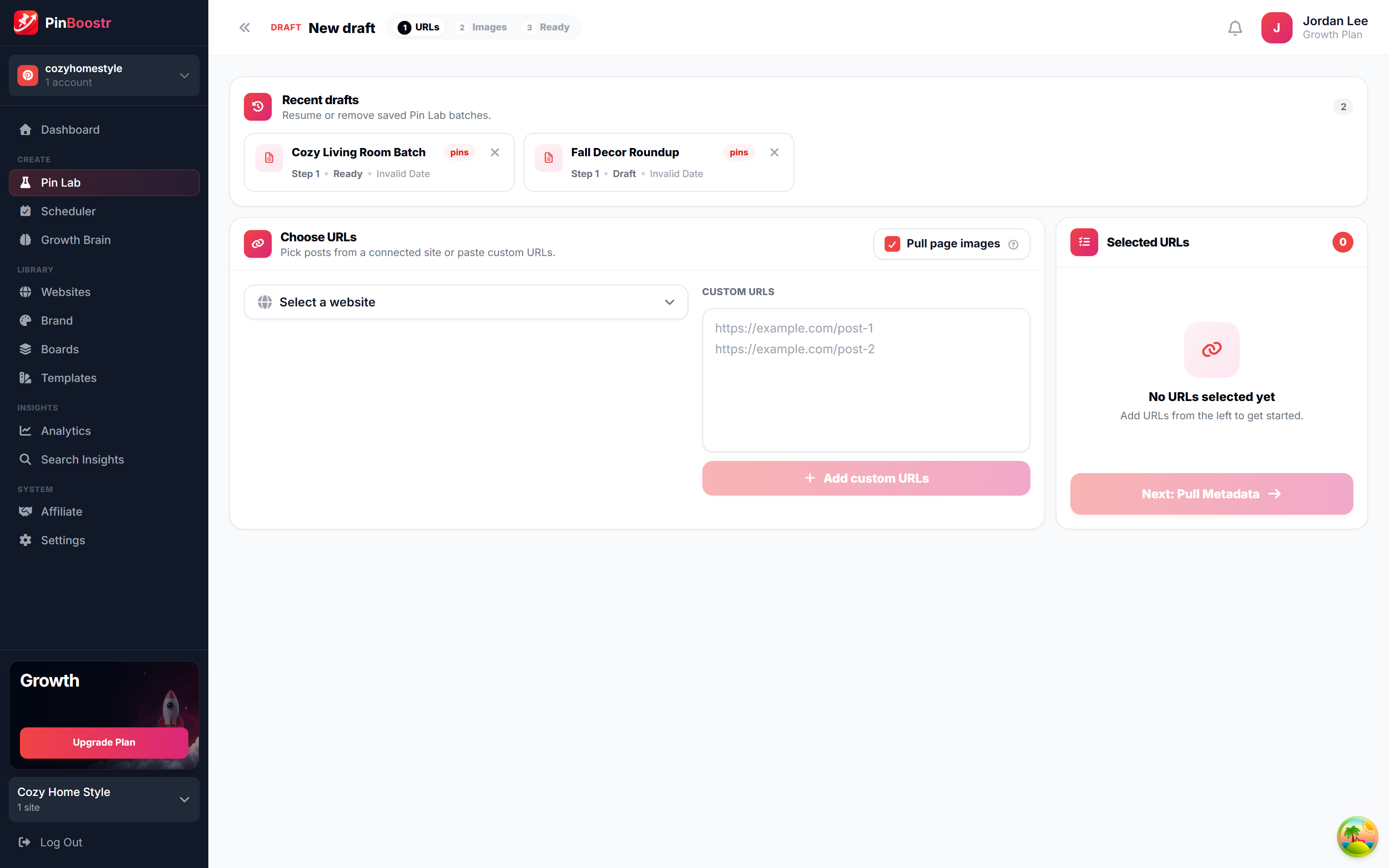
PinBoostr Pin Lab editor creating a branded Pinterest pin
Pin Lab generates branded pins
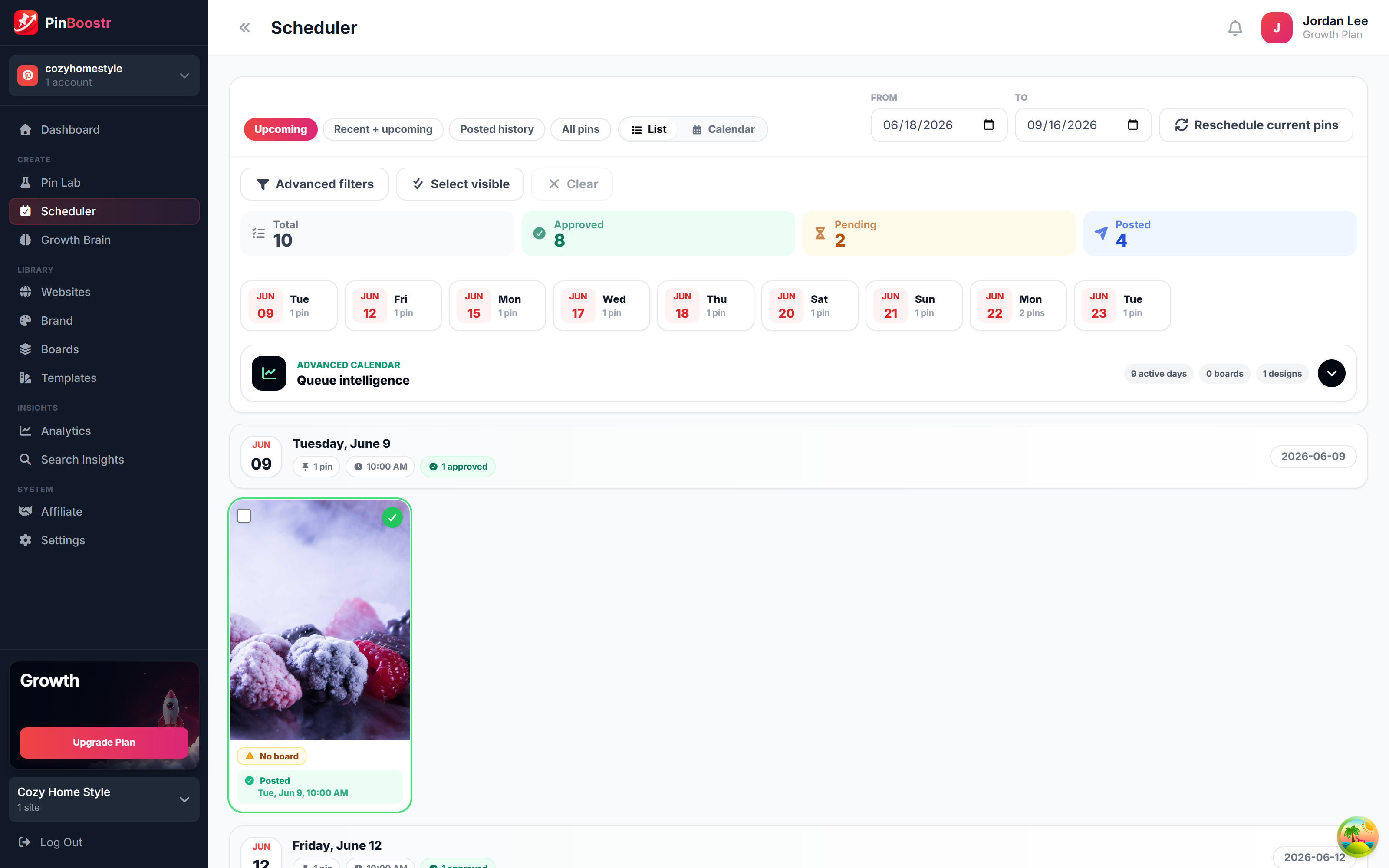
PinBoostr scheduler queue publishing approved pins through the official Pinterest API
The scheduler publishes approved pins

Best Taplio Alternatives FAQ

What is the best Taplio alternative?

For most people who mainly write and schedule, PinBoostr: it covers writing, AI drafts, carousels and scheduling through LinkedIn's official API for $19.99 a month, with Pinterest included. AuthoredUp is the better pick if previews and analytics matter most, and Supergrow if you want AI to do more of the writing.

Is there a free Taplio alternative?

Yes. LinkedIn's own scheduler is free and holds posts up to 3 months ahead, and Buffer's free plan connects up to 3 channels. Neither helps you write or design. PinBoostr has a 14-day free trial but no free plan.

Why do people leave Taplio?

Mostly price for what they use. Taplio starts at $39 a month, and its lead and outreach features sit on the $199 Pro plan. People who only write and schedule often find a cheaper tool does that part as well. Some also prefer a tool with no browser extension acting in their LinkedIn session.

Is Taplio safe for my LinkedIn account?

Taplio schedules through the official API, which is the supported path. Its engagement features run through a Chrome extension in your logged-in session, and LinkedIn's User Agreement prohibits software that takes automated actions for you. Using the scheduler and skipping auto-engagement keeps the risk low. See our guide on whether LinkedIn automation is safe.

Does any alternative have a database of viral posts like Taplio?

None of the alternatives here has an inspiration library as large as Taplio's. If that library is what you use Taplio for, it may be worth keeping. If you mostly write your own ideas, you will not miss it.

Skip the comparison shopping

PinBoostr writes, designs and schedules your LinkedIn posts through the official API, and nothing goes out until you approve it.

Try PinBoostr free

No credit card required.